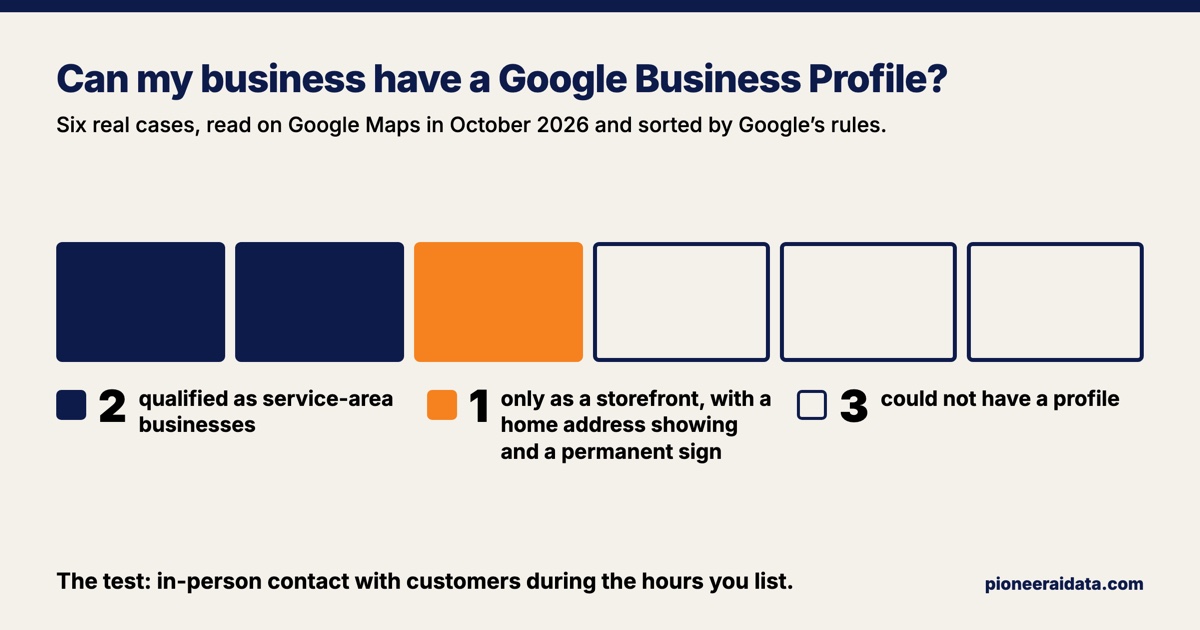
Your business can have a Google Business Profile if it meets its customers in person during the hours it lists, either at a place it runs or at the customer's own home or job site. You do not need a storefront. Google calls a business that goes out to its customers a service-area business, and that kind of profile hides the address. What Google's rules exclude is an online-only business, which has no face-to-face contact at all, and a group that meets at a venue it doesn't own or have the authority to represent.
In October 2026, I had an AI agent read Google Maps for six cases whose websites I built or run, from the public side, signed out, without changing any listing: five on October 20, and the sixth, an online product of my own, on October 28. Sorted by Google's rules, two qualified as service-area businesses, one could have a profile only as a storefront with its owner's home address showing and a permanent sign, and three could not have one at all. Checks like this can be part of the website work inside a Pioneer AI and data contract.
Who can have a Google Business Profile
A business can have a Google Business Profile if it makes in-person contact with customers during the hours it lists. Google's eligibility guidelines put the test in one sentence: "To qualify for a Business Profile, a business must make in-person contact with customers during its stated hours." The exceptions are few and specific: ATMs, video-rental kiosks and express mail drop boxes are allowed, a seasonal business qualifies if it keeps permanent signage up all year, and delivery-only food services are allowed with conditions.
Google's eligibility page also lists businesses that can't have a profile, among them:
- "An ongoing service, class, or meeting at a location that you don't own or have the authority to represent."
- "Brands, organizations, artists, and other online-only businesses."
- "Rental or for-sale properties such as vacation homes, model homes, or vacant apartments," though a sales or leasing office is eligible.
- "Lead generation agents or companies."
- "Any business whose address is listed as a P.O. box or mailbox in a remote location."
Google's guidelines for representing your business add two more address cases. A virtual office, meaning a mailing address a business rents but doesn't work from, "isn't eligible for a Business Profile." An office in a co-working space counts only if it "maintains clear signage, receives customers at the location during business hours, and is staffed during business hours by your business staff."
Can you have a Google Business Profile without a storefront?
Yes. A business without a storefront can have a Google Business Profile as a service-area business, which Google defines as "a business that visits or delivers to customers directly but doesn't serve customers at their business address," with cleaning services and plumbers as its examples. A service-area profile shows the cities, postal codes or other areas you cover instead of a street address. Google's service-area page is plain about the address: "If you don't serve customers at your business address, remove your address from your Business Profile." Google's guidelines give the home-based version: "if you're a plumber and run your business from your residential address, clear the address from your Business Profile."
The setup asks the question that sorts you. Google's sign-up steps ask whether you have a location customers can visit, and the answer is No for any business that doesn't have "a storefront staffed during business hours." Then you list your service areas, under two limits and one guideline from Google's service-area page:
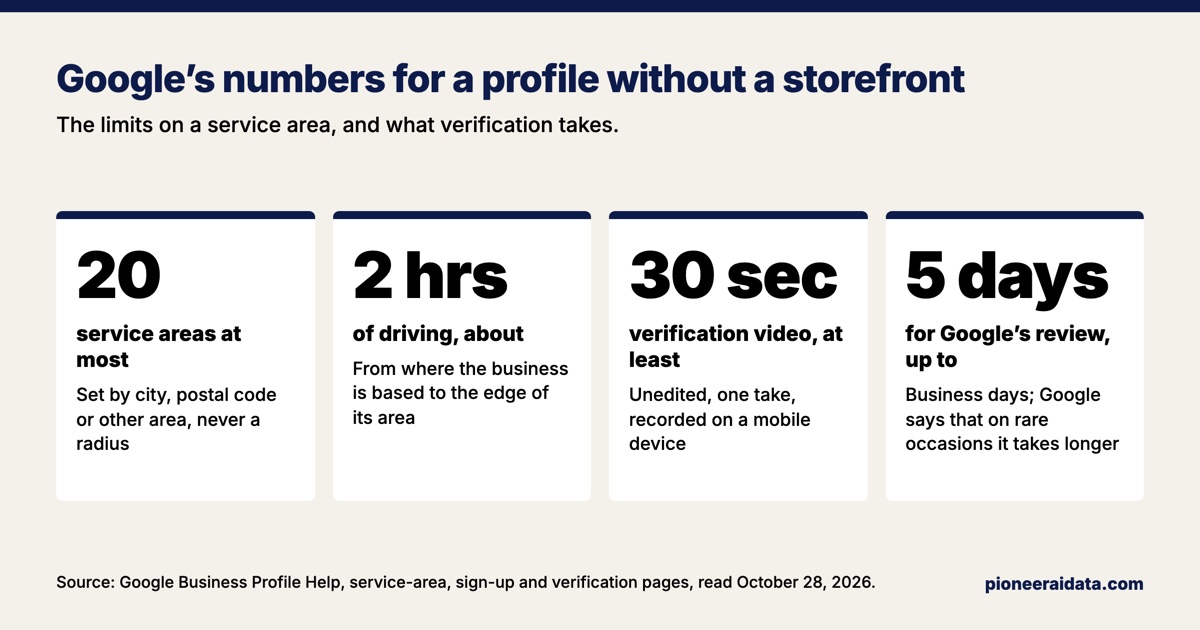
- Up to 20 areas, "based on the cities, postal codes, or other areas you serve."
- No radius. "You can't set your service area as a radius distance around your business."
- About 2 hours of driving, as a guideline. The overall area "shouldn't be more than about 2 hours of driving time from where your business is based," though Google's guidelines allow that a larger area suits some businesses.
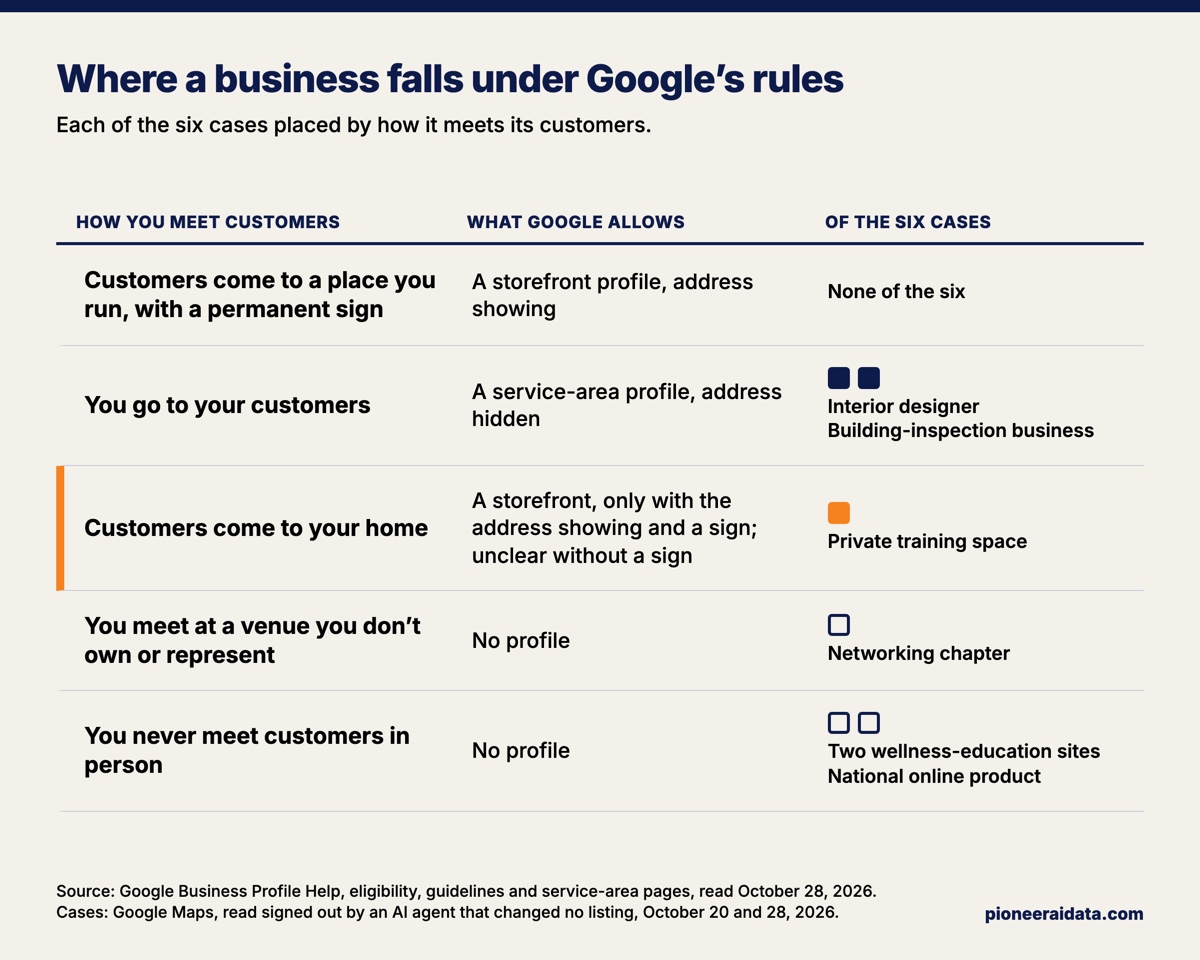
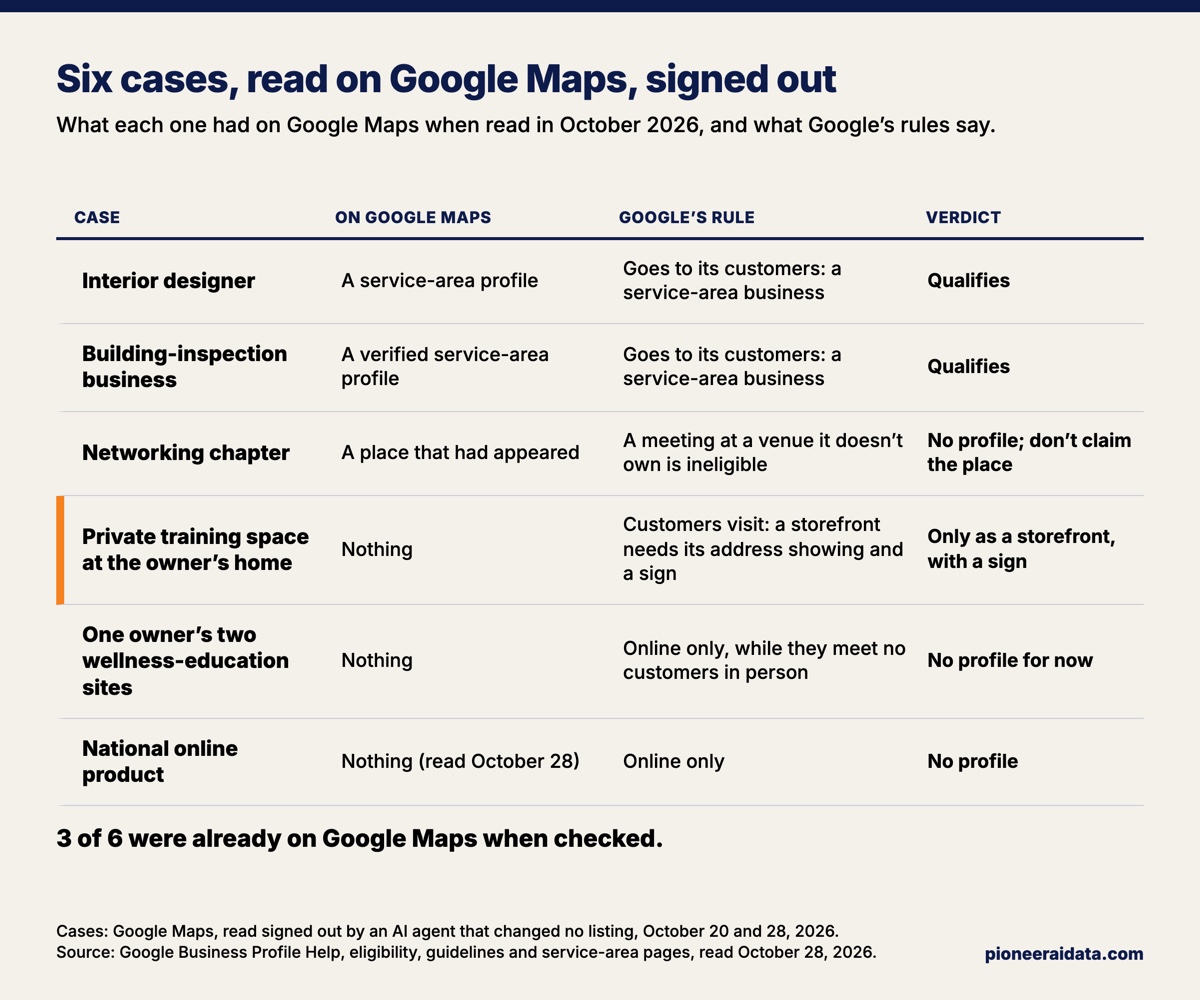
Two of the six cases were service-area businesses, and both qualified: an interior designer and a building-inspection business that works at its customers' sites. Neither has a storefront, both had service-area profiles with no address showing, and the inspection business's profile was verified.
What if customers come to your home?
If customers come to your home, Google's pages don't give one clean answer, and the reading that fits Google's definitions is a storefront profile with the address showing and a permanent sign. Two rules point that way. The service-area profile, the one that hides the address, is defined for "a business that visits or delivers to customers directly but doesn't serve customers at their business address," and a home where customers arrive is a place where the business serves them. And Google's guidelines say "Businesses showing their address on Google should maintain permanent fixed signage of their business name at the address."
Two other lines point the other way. Google's video verification page says "If your business doesn't have permanent on-site signage, list it as a service-area business instead of storefront," and its sign-up page says "If your business doesn't have a storefront where you receive customers, you must hide your business address." Read literally, those lines would put a home business with no sign on Maps as a service-area business, even though its customers come to it, which the service-area definition does not describe.
One of the six cases sits in that gap: a private training space at its owner's home, booked by appointment, with no street address on its website. Google Maps had no place for it. A storefront profile would mean the home address on Google and a permanent sign out front, a trade only the owner can make, and a service-area profile would describe a business that goes out to its customers, which this one doesn't. The recommendation was to keep it off Maps and let the website and the business's Facebook page carry it, in part because my rule for this work is never to put a street address on a listing unless the business already prints it on its own website.
A business that runs only by appointment also leaves its hours off, because Google's guidelines say businesses "that operate only by appointment" shouldn't provide hours.
Why a group that meets at someone else's venue can't have one
A group that meets at a venue it doesn't own or have the authority to represent can't have a Google Business Profile, because Google's ineligible list includes "An ongoing service, class, or meeting at a location that you don't own or have the authority to represent." The rule covers a networking chapter that meets at a restaurant, or a weekly class held in a space someone else runs. The venue can have its own profile, and the group's meeting time and place belong on the group's own website.
The networking chapter in the six cases meets weekly at a venue it doesn't own, and it showed up on Google Maps anyway. A search on October 15 had not found it; by the check on October 20, a Maps place for the chapter had appeared at the venue's address. Nothing on record says who made it, and it could have been anyone, because Google lets anyone add a place to Maps. Google Maps Help says "You can add missing places to the map. The place shows publicly once it's added."
If a place exists for your group and Google's rules exclude the group, don't claim it. Google's add or claim page says "Only businesses eligible for a Business Profile can add or claim their location on Google," and its guidelines say "Google reserves the right to suspend access to Business Profiles on Google or other Google Services to individuals or businesses that violate these guidelines." The recommendation for the chapter was not to claim the place, and to correct anything wrong on it by suggesting an edit, which any Google Maps user can do. Google's help on errors in Maps says a user "can change info like the name, address, hours or other facts" about a place.
Why an online-only business can't have one, and when that changes
An online-only business can't have a Google Business Profile, because Google lists "Brands, organizations, artists, and other online-only businesses" as ineligible. Two of the six cases were online: two wellness-education websites run by one owner who doesn't meet customers in person yet, and a national online product with no storefront and no service area. Neither had a profile, and under Google's test neither should.
An online business becomes eligible once it starts meeting customers in person. If that owner starts going out to schools or clients, the business becomes a service-area business by Google's own definition, and a profile with a service area and no address becomes available. Until then, the effort belongs on the website, which is where an online business gets found. What a site needs for that, AI assistants included, is in what your website needs to get found by AI assistants.
Check whether you already have a profile before you make one
Search Google Maps for your business before you create a profile, because one may already exist and Google allows only one. Three of the six cases were already on Maps when they were checked: the inspection business's verified profile, the designer's profile and the chapter's place. Google's guidelines say "There should only be one profile per business," and its setup page warns that "Your Google account may be suspended if we find multiple profiles for the same business in the same metropolitan area."
What you do next depends on what the search finds:
- An unverified profile for your business, if your business is eligible: claim it from Google Maps with "Claim this business." Google says you can add or claim a business "at no charge."
- A profile someone else verified: request ownership. Google notifies the current owner, who "has 3 days to respond." For a service-area business with no shop or office, Google's page says to contact Google instead.
- Nothing: create one, under the name your customers know.
The name is the next thing to get right. Google's guidelines say a profile's name "should reflect your business's real-world name, as used consistently on your storefront, website, stationery, and as known to customers," and they list "irrelevant legal terms (e.g. LLC, LTD, INC)" as not allowed unless signage, business cards or invoices show the business using them.
How Google verifies a business with no storefront
Google verifies a business with no storefront by a method it chooses, and when a video is one of the options, Google recommends it. Its verification page says "Verification methods are automatically determined by Google and can't be changed," and "If your business is eligible for video verification, we recommend that you use this option." Verification is what lets customers find a profile you create: Google's sign-up page says customers "can only find your business profile on Google after you complete verification." A place someone else added can still show publicly before anyone verifies it, as the chapter's did.
Google's video rules are specific:
- The video must be "An unedited, unique, and complete recording with no breaks," "At least 30 seconds long," and "Recorded and uploaded from a mobile device."
- It must not include other people's faces, private information, or sensitive numbers such as bank account, tax or ID numbers.
- A service-area business shows where it operates, the tools or equipment it works with, and proof it manages the business. Google's examples include unlocking a van with the business's branding, or a permit, invoice or utility bill in the business's name.
- A service-area business run from home can verify its address without filming the house: "If you run a service-area business from your home, you can record landmarks and signs in your immediate neighborhood to verify the address."
Google says verification reviews "take up to 5 business days," and that "On rare occasions, reviews may take longer."
Five questions that settle it for your business
Five questions sort any small business by Google's rules:
- Do you meet customers in person, at your place or theirs? If not, Google's eligibility page lists online-only businesses as ineligible.
- Where do you meet them? At a place you run with a permanent sign: a storefront profile, address showing. At their home or site: a service-area profile, address hidden. At your home, where they come to you: a storefront profile needs the address showing and a permanent sign, and Google's pages don't settle the case without one. At a venue you don't own or have the authority to represent: no profile.
- Are you already on Google Maps? Search first. Claim an unverified profile if your business is eligible, request ownership of a verified one, and never make a second.
- Is the name the one on your sign, website and invoices? Leave off "LLC" unless your real-world materials use it.
- Does your service area match where you actually go? Up to 20 cities, postal codes or other areas, and Google's guideline is about 2 hours of driving.
Want this run for your business?
Book a free discovery call. We map where AI fits, show you the numbers, and point you to the right plan. No pressure, no jargon.
Book a Discovery Call →