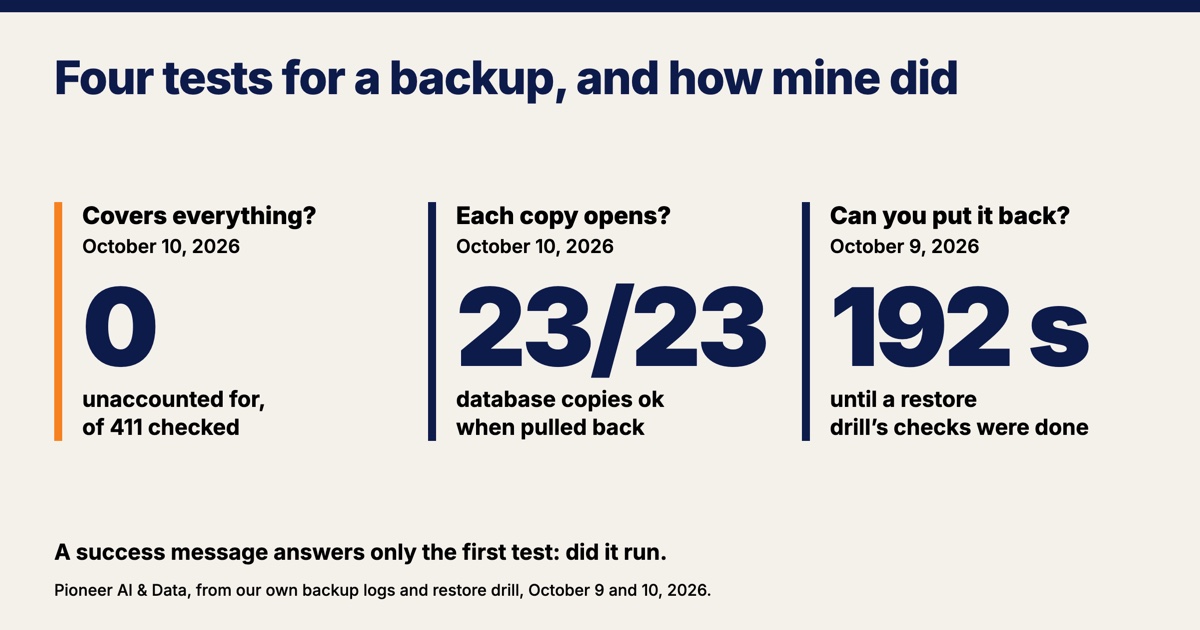
To test your backups, answer four questions in order: did the backup run, does it copy everything that matters, does each copy open, and can you put one back in a known amount of time. A backup answers only the first question by itself, with a success message. It is easy to stop there, because on a good night a success message is the only thing a backup sends.
In October 2026 I put my own server's nightly backup through all four. The backup's own count of the disk on October 10 found 411 files named like a database and 0 that no list accounted for. The 23 database copies from the backup's last run that morning were pulled back down from off-site storage, and every one passed SQLite's full integrity check. A restore drill on October 9, on an isolated copy of the server, had every check finished 192 seconds after the build began.
I run my own systems and several clients' systems, and keeping them recoverable is part of the monthly upkeep in my AI and data work. Here is how each of the four tests works and what it showed on mine.
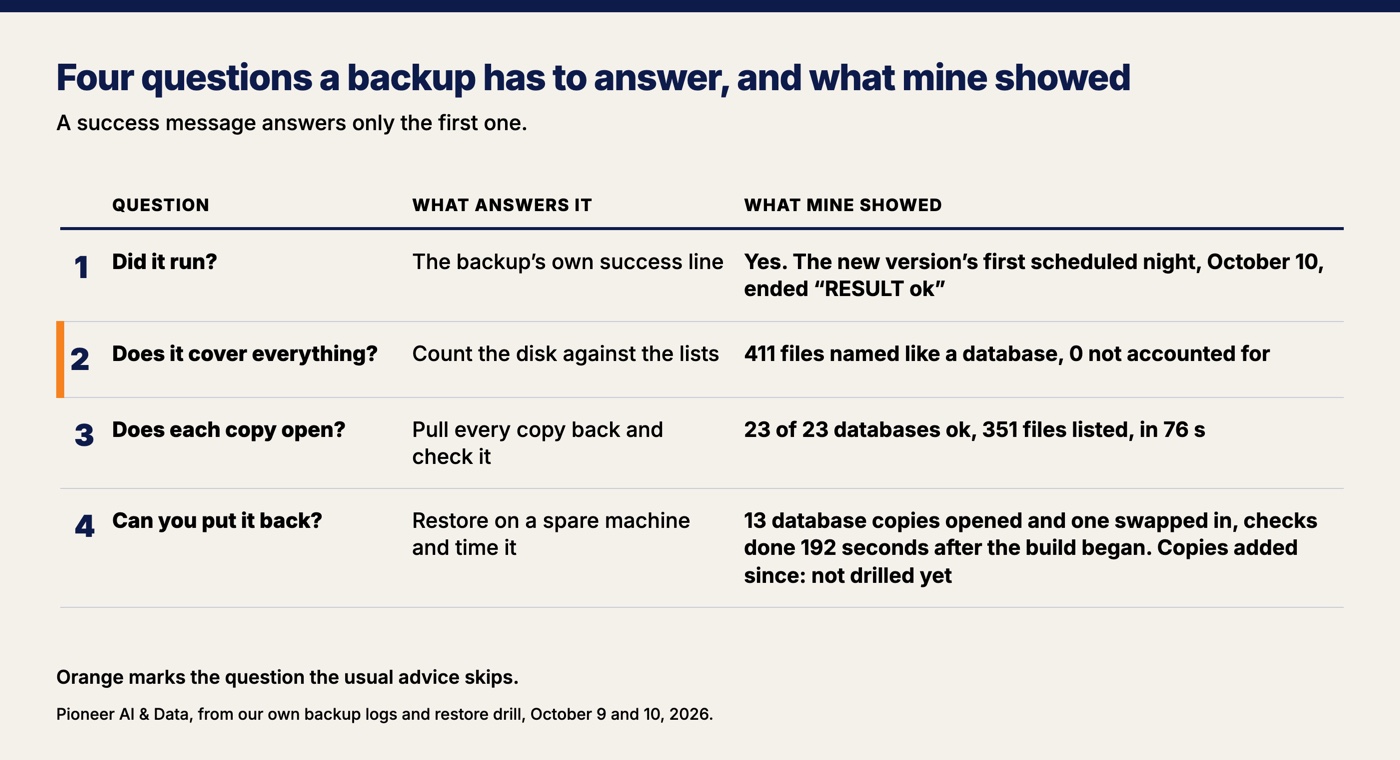
A backup's success message only proves the job ran
A backup's success message says the job finished the work it was given, and it cannot say anything about work it was never given. A backup that works from a typed list (these databases, these folders, this drive) is blind in one direction: it cannot see what was never put on the list. Add a new app or a new shared folder, and unless someone remembers to add it, the backup goes on reporting success on everything else.
My server's backup checks its own lists against the disk every night and fails when the two disagree. Any database file the count finds that is on no list fails the backup, and the failure names it. A listed database that has gone missing fails the backup too.
Test whether your backup covers everything, not only whether it ran
The test for coverage is a count: find everything on the system that holds data, and make the backup account for every item. My backup runs a version of that count every night, after it copies: every file named like a database, and every entry in my web apps' data folders. On October 10, 2026 it found 411 files named like a database in the folders where my apps keep data: 23 on the backup list, 383 left alone on purpose, 5 that were not databases after all, and 0 unaccounted for.
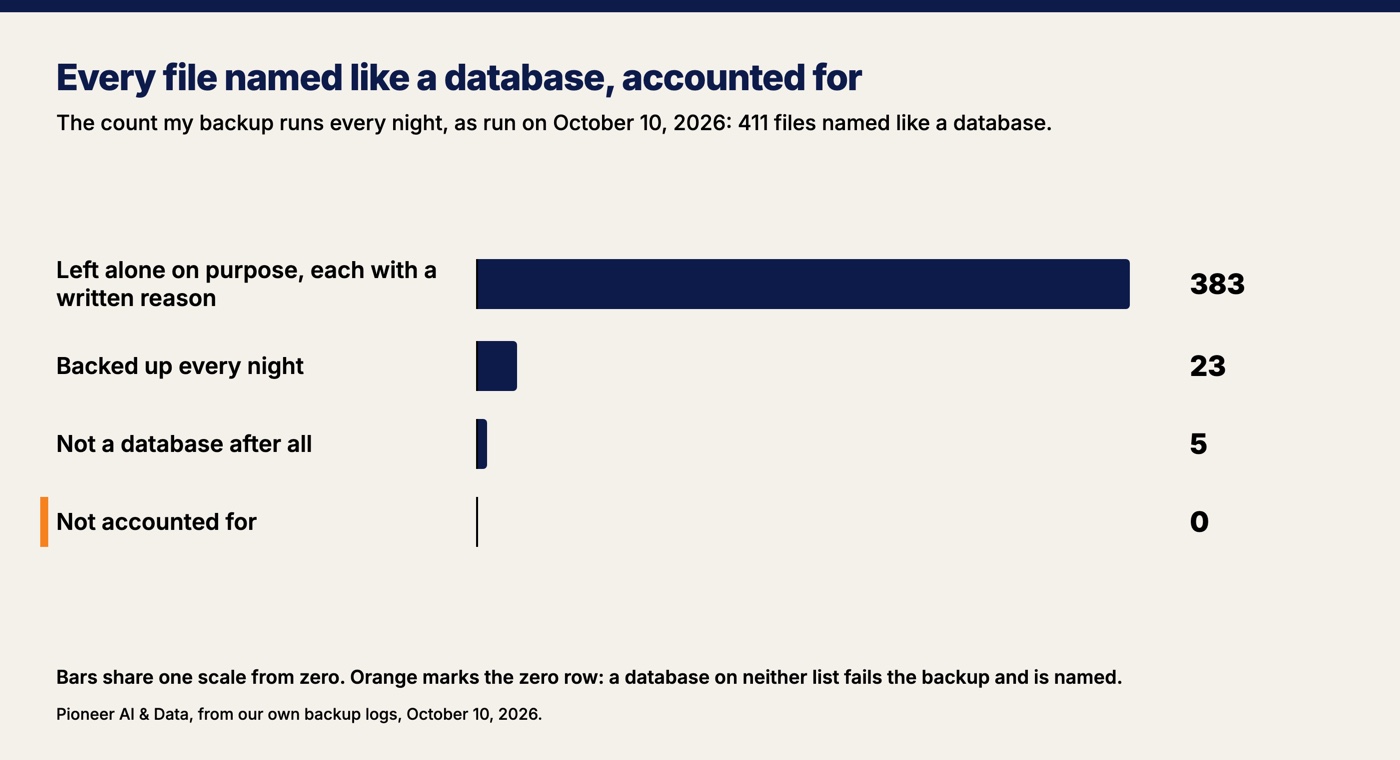
The 383 left-alone files sound alarming until you read the reasons. Every file on the left-alone list carries a written reason, and the reasons fall into a few kinds: copies an app makes of itself, login sessions whose loss only signs people out, a database another backup job already copies, files from features I retired, a file built elsewhere and shipped with an app, a mirror of my own notes, and copies made by hand. Files left alone are still in the server's daily snapshot, a copy of the whole disk kept off the server for 14 days. A long left-alone list is fine as long as every database file the count finds has a written decision behind it, and a database that turns up on neither list fails the backup the next night.
The same count runs on the folders where my web apps keep uploads and other files that are not databases. On the morning of October 10 it found 187 entries: 29 archived, 78 database files, side files and dated copies, 80 left alone on purpose, and 0 unaccounted for.
My backup list is 24 databases now. A new app went up on the server on October 13, and its database joined the list the same day.
A small business does not need a script to run this test. Write down every place your business keeps information you would hate to lose: the accounting file, the booking or scheduling app, the shared drive, the forms on your website, the spreadsheet only one person updates. Then ask whoever runs your backup to show you each one on their list, or to tell you why it is off.
Read every backup copy back, not a sample
A backup copy you have never opened is a guess. Reading a copy back means pulling it down from off-site storage, unpacking it, and checking it the way you would check the original. The usual advice is to restore a sample of files now and then. At my size there is no reason to sample.
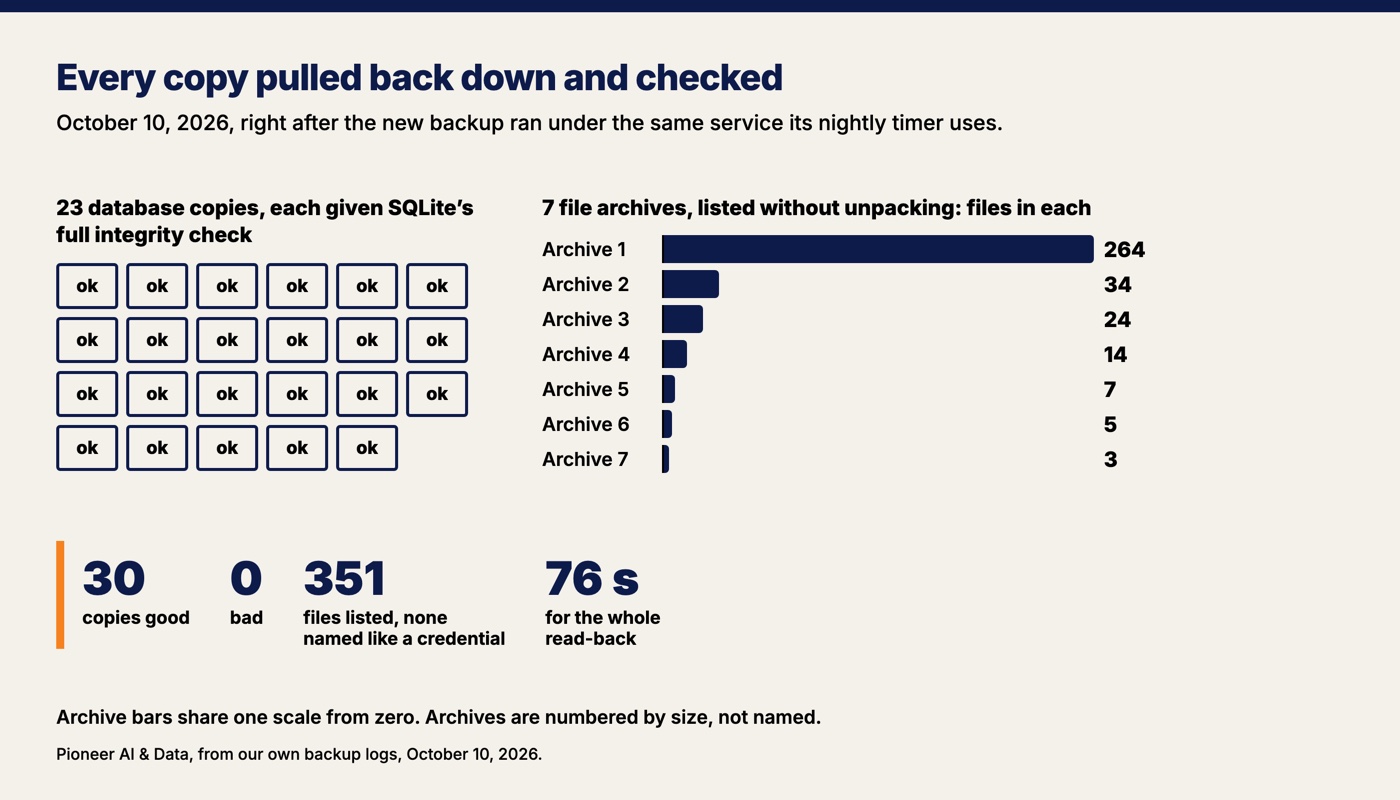
On October 10, 2026, right after the new version of my backup ran once under the same service its nightly timer uses, every copy that run had made was pulled back down. Each of the 23 database copies was unpacked and given SQLite's full integrity check, which reads the whole file looking for missing pages, malformed records and index entries that do not match, and answers "ok" when it finds nothing wrong. All 23 database copies answered ok. SQLite is the database behind every live app of mine that keeps one, an ordinary file with no separate server behind it.
The 7 file archives were listed without being unpacked: 351 files across the seven (264, 34, 24, 14, 7, 5 and 3), and not one file in any of them named like a credential, such as a password or key file. The whole read-back took 76 seconds. The last line it printed began "READ BACK good=30 bad=0."
The read-back matters more for databases than for photos. SQLite's own documentation warns that a backup copied in the middle of a write might contain "some old and some new content, and thus be corrupt". My backup copies each database with the database's own backup command, which is built to be safe while an app is writing. "Built to be safe" is a claim, and the integrity check is the proof.
Federal guidance asks for backups to be tested and checked. NIST's Cybersecurity Framework 2.0 says backups of data should be "created, protected, maintained, and tested," and that "the integrity of backups and other restoration assets is verified before using them for restoration." CISA's ransomware guide says to "regularly test the availability and integrity of backups in a disaster recovery scenario." Pulling every copy back and checking it, on an ordinary day, is the plainest way I know to do both before a bad day forces it.
The backup fault no success message would have shown
Some backup faults leave no trace at all, and the kind that worries me most is a rule that leaves files out. My backup has a list of name patterns for files that must never be copied, such as password and key files. Before the new version was installed, an independent reviewer read it four times. On the third pass the reviewer found one pattern with its wildcard star, the asterisk that stands for any run of characters, in the middle of a name instead of at the end.
The star's position mattered because the archiving tool lets a star match across folders. As written, the rule would have quietly left out every file ending in .json inside any folder whose name began a certain way. The backup would still have reported success. The read-back would still have passed, because an archive missing files lists cleanly, only shorter. An integrity check proves a copy is sound, not that it is complete. And the backup's other two checks for credential files read one file name at a time, so they would not have caught it either.
The fault was caught before the new version was installed, and the fix was moving the star to the end of the name. The lesson is bigger than one character: a rule that leaves something out of a backup needs a second reader, because no count, no integrity check and no success message will flag it. My reviewer was a separate AI session that had not written the script, the same kind of check behind the faults I counted in can you trust AI-generated code.
Restore a backup on a spare machine and time it
The last test is a restore drill: rebuild from the backups on a machine that is not your real one, and time how long it takes to work again. A copy that opens is not the same as a business that runs again. Two of my drills have put a database back.
In August 2026 I rebuilt my whole server from a snapshot onto a blank machine and had the three sites I timed serving again in 3 minutes 19 seconds, which I wrote about in what you keep when an AI engagement ends. On October 9, 2026 I ran a fuller drill on an isolated copy of the server. All 13 database copies then on the list came down from off-site storage and opened clean, one was swapped in as a real restore, and every check had finished 192 seconds after the build began. Then the copy was torn down with nothing left behind.
I plan to repeat the restore drill every quarter, and the next one is due in mid-November. The ten databases and seven file archives added to my backup on October 10 have been pulled back and checked. None of the copies added since the October 9 drill has been restored in a drill yet.
How to test your backups this week
Here are the four backup tests as a routine a small business can start this week. The first two cost nothing.
- Did it run? Find the backup's last message and read the date on it, not only the green check. A success from last Tuesday is not last night.
- Does it cover everything? Make your own list of every place your data lives and compare it with the backup's list. Anything on yours and not on theirs is a gap until someone says why.
- Does each copy open? Open last night's copy somewhere other than the original. For a database, run its own integrity check. For files, open a few you would need on a bad day.
- Can you put it back, and how long does it take? Restore onto a spare machine, time it, and write the time down. Then do it again next quarter.
The test the usual advice skips is the second. A backup that runs every night and opens every time can still be copying the wrong list, and only a count against the disk will show it. Mine runs that count every night, and on October 10 it accounted for all 411.
Want this run for your business?
Book a free discovery call. We map where AI fits, show you the numbers, and point you to the right plan. No pressure, no jargon.
Book a Discovery Call →