You find out your website is broken by doing what a customer does, on a schedule, and making the check say something out loud when it fails. Watching for the site to go down will not get you there. The failures that cost a small business money almost never take the site offline.
A site that is down is obvious. Your phone lights up and somebody sends you a screenshot. The expensive version is quieter. The page loads, the form submits, the button says thank you, and nothing on the other end happened. Nobody complains, because from the customer's side it worked.
We build and run websites as part of our AI and data work, and most of what follows comes from breaking our own.
A broken website usually still returns a success code
A broken page often reports success, which is why nothing alerts you. Every web request comes back with a status number. 200 means it worked. 404 means the page is not there. A server will send 200 along with a page reading "Sorry, something went wrong," because as far as the server is concerned it delivered a page.
Google has a name for a success code wrapped around an error. Its documentation on HTTP status codes says: "If the content suggests an error for Google Search, an empty page or an error message, Search Console will show a soft 404 error." The same page warns that "an HTTP 2xx (success) status code doesn't guarantee indexing." A soft 404 is a page that is broken for a person and successful for a machine. Monitoring that only asks whether the site answered will never catch one.
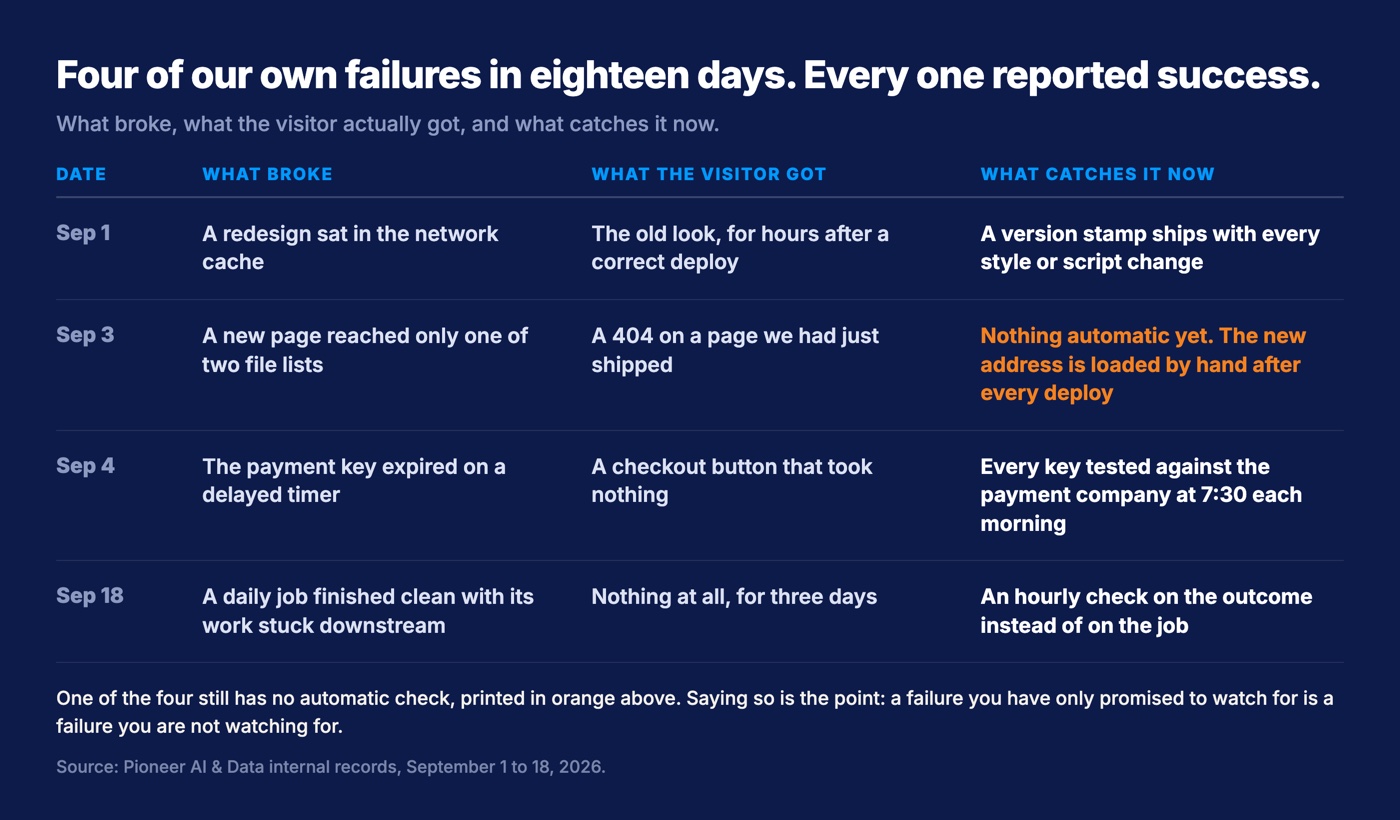
We got the deploy version of the same lie on September 3, 2026. We shipped a new landing page, the script reported success at every step, and visitors got a 404. Our deploy script keeps two lists of files maintained by hand, one that copies a file up to the server and one that moves it into place, and the new page had been added to only the first. Nothing in the process noticed that a file it had just copied never arrived anywhere.
The builder that publishes this blog now stops the whole build on two failures that used to be invisible. A post with no image does not get published. Two posts sharing an address do not get published either, because the second would overwrite the first without saying so. Neither a missing image nor a duplicate address throws an error on its own. Both just produce a worse website that looks fine.
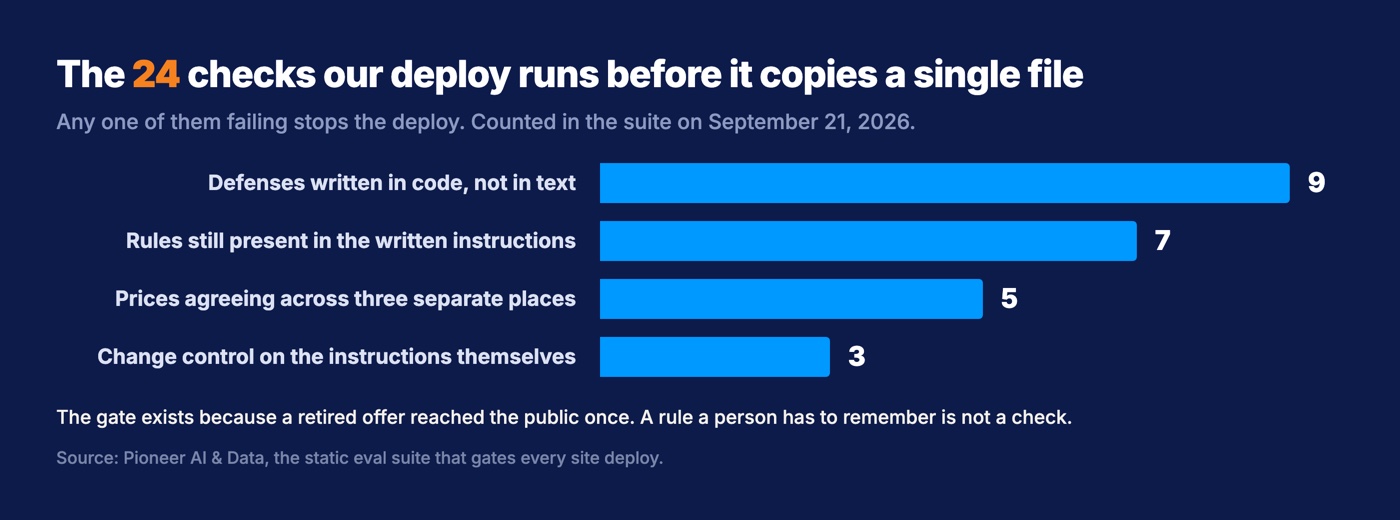
Every deploy of our site now runs 24 automated checks before it copies a single file, and refuses to ship if any of them fail. Nine of them cover defenses written in code rather than in text, including the reply length cap on the site assistant and the rule that no conversation history is ever sent. Another seven read the assistant's written instructions and fail if a rule has gone missing. Five compare our prices across the three separate places they are written down. The last three are change control, and one of those closes the gate the moment the instructions are edited without a person re-approving them.
Our checkout ran on a dead key and nothing said a word
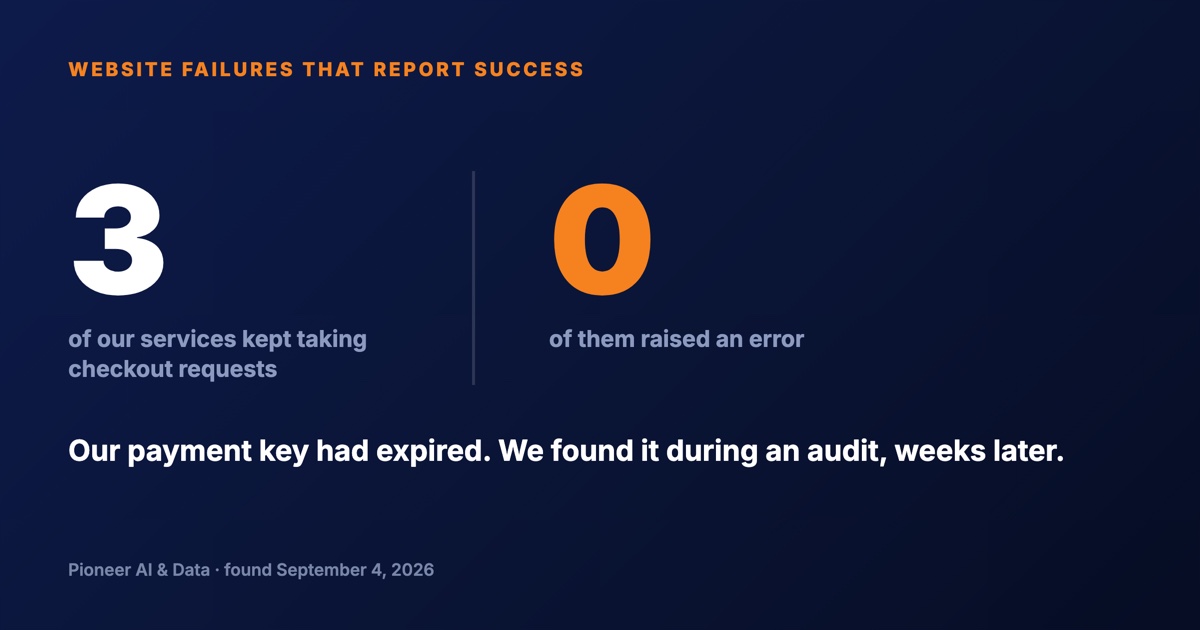
Our own checkout took requests on an expired key for weeks and not one system involved raised a flag. A key here is the password your website uses to talk to your payment company. Ours had been rolled with a delayed expiry, which means it was set to die on a future date instead of being replaced on the spot. When that date arrived the key stopped working and disappeared from the dashboard. No email, no error page. The checkout button still looked like a checkout button.
One expired key took down more than one checkout. The same key sat in three separate services, so three different ways to pay us stopped working at the same moment. We found the dead key on September 4, 2026, during an audit we were running for an unrelated reason.
The part that is hardest to defend is our own written record. A note in our internal registry said the services holding that key had been stopped. They had not been stopped. They were serving checkout on it. A written record is not a check. A note is a claim about the past, and it stops being true the moment something changes and nobody edits it.
What replaced the note is a check that runs whether anyone remembers or not. Every morning at 7:30 Eastern, a job tests each application's key against the payment company directly and fails if the applications have drifted onto different keys. When a key is rejected, the card on our dashboard turns red that day and an email goes out. The important part is who gets asked. The check asks the payment company, not us.
A change can go live and reach nobody
A change to your site can deploy perfectly and reach zero browsers, because the copy visitors receive is held near them rather than on your server. Content delivery networks keep copies of your files close to your customers so pages load fast, which is the entire point of them. The side effect is that a stylesheet you replaced this morning may reach nobody for hours, because the network is still handing out the copy it already has.
On September 1, 2026, we redeployed a site with a complete visual redesign. The deploy was correct. Visitors kept getting the old look. The fix was a version stamp on the static files, which makes the new file a different file as far as the network is concerned, and it shipped as a second release the same day.
Version stamps are a written rule now for every site we run: a style or script change ships with one, or the network serves the old version for hours. The way we check the work changed too. A cache buster is a meaningless parameter tacked onto the end of the URL so the network treats the page as one it has never seen, and that is now how we look at a live site. The browser tab you have had open all morning proves nothing, and neither does opening the file on your own computer, which has none of the caching a real visitor has.
A form that submits is not a form that arrives
A contact form can submit successfully and still never reach your inbox, because accepting the message and delivering it are two different systems. The form's job ends the second it says thank you. Everything after that is email, and email has gotten much stricter about whose mail it will accept.
Since February 1, 2024, Google's sender guidelines have required every sender to authenticate with SPF or DKIM, two ways of proving that mail claiming to come from your domain actually did. Bulk senders, meaning 5,000 or more messages a day, also need DMARC, a published policy telling receiving servers what to do with mail that fails those checks. Google's wording on mail that does not meet the requirements is that it "might be marked as spam or rejected." Google also publishes a line not to cross: keep the spam rate reported in Postmaster Tools below 0.3%, and preferably below 0.1%.
Rejected is the word that should worry a small business. Your form still says thank you. The lead is gone.
The check takes two minutes and belongs on a calendar. Send yourself a real inquiry through your own form, then go confirm it landed in the inbox a human actually reads. Run it again any time somebody touches your website, your email host, or your domain settings, because all three can break delivery without touching the form.
Your certificate expires on a schedule nobody put on your calendar
Your site's security certificate has an expiration date, and when it passes, every visitor gets a full-page browser warning saying your site is not safe. An expiring certificate is quiet right up until it is the loudest thing on your website. It belongs on this list because the renewal deadline is about to start arriving several times a year instead of annually, and most owners have never given it a thought.
Today a certificate can last a maximum of 398 days, so renewing is roughly an annual chore. The annual rhythm is ending on a published schedule. The CA/Browser Forum, where certificate authorities and browser makers set these rules together, passed Ballot SC-081v3 on April 11, 2025, with 25 of 30 certificate issuers in favor and all four of the browser-side members in favor. The schedule now sits in the Baseline Requirements it amended: a maximum of 200 days effective March 15, 2026, 100 days effective March 15, 2027, and 47 days effective March 15, 2029.
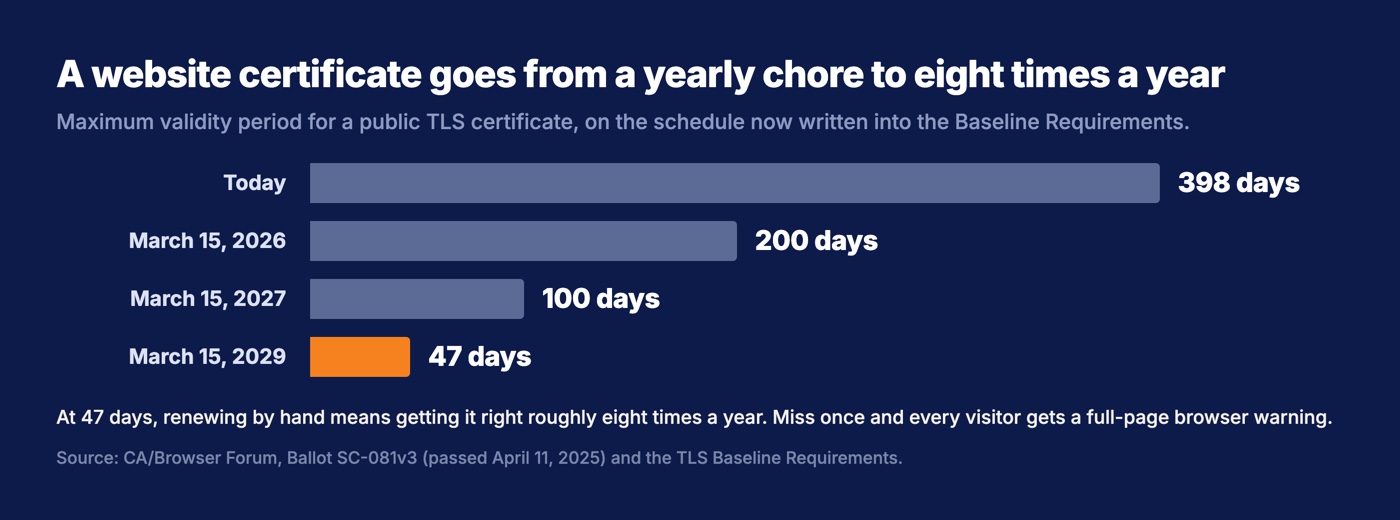
A 47-day certificate means renewing about eight times a year. Nobody is doing that by hand and getting it right every time. Find out today whether yours renews on its own, and whether anybody gets told when a renewal fails. A certificate you are renewing by hand is now the likeliest way your website takes itself offline.
Green means the job ran, not that the work landed
A monitoring light that turns green tells you a job finished without an error, which is not the same as the work reaching anybody. We proved that on ourselves in the least flattering way available.
We run 20 scheduled jobs across two machines and every one files a report after every run. On September 18, 2026, one daily job had read OK for three days straight while not a single message it produced had reached a person. The job did its own part correctly, handed the message off, and exited cleanly. The step downstream of the handoff was dead, and our dashboard could only see the handoff.
The rule that came out of it is now printed on the dashboard: green means the job exited cleanly, not that its work landed. The fix was a second check that tests the outcome rather than the job, running every hour. Its first report was a failure, which is usually how you know a check was worth building.
We built the dashboard because nothing was watching any of it. The first day it collected anything, it found a health check that had failed 41 of 2,613 runs over two weeks and one overnight backup run that had failed. Both had been invisible. Nothing about either failure was new that day. The only new thing was something looking.
The checks worth running on a small business website
The checks worth running on a small business website are the ones that copy what a customer does and then make noise when they fail. Here is the whole list, and none of it needs a developer.
- Do what a customer does, on a schedule. Once a month, submit your own contact form from your phone on cell data and confirm the email arrives. If you sell online, buy something with a real card and refund yourself. If you take bookings, book one.
- Walk the pages you never look at. Your home page is the one page you would notice. Click through the rest once a quarter and press every button on them.
- Know your expiration dates. Domain, certificate, and every key your site uses to talk to another company. Put each renewal on a calendar with a person's name next to it, and confirm the automatic ones actually ran.
- Verify from outside after anything ships. Load the live site with a cache buster on the URL, on a device that has never seen it.
- Make every check say something out loud when it fails. A check nobody hears about is not a check. Ours turn a card red and email a person.
- Put a date on the last time each check passed, not the last time somebody wrote it down. Our own note said three services were stopped while all three were busy serving checkout on a dead key.
Rule six is the one I would keep if I could only keep one.
None of the failures in this post were sophisticated. An expired key, a file missing from a list, a cached stylesheet, a rejected email, a job that exited cleanly, a date nobody wrote down. What they share is that every one of them reported success. Somebody has to actually look, on a schedule, at the thing a customer would do, which is what our commitment to keeping people in the driver's seat means once you get past the slogan.
The failure that taught us the most is the site assistant that spent two weeks telling visitors about an offer we had already retired, which we wrote up in the four questions to answer before buying a chatbot. The assistant never broke. It worked exactly as built, on information that had stopped being true. Most of what goes wrong on a website looks a lot like that.
Want this run for your business?
Book a free discovery call. We map where AI fits, show you the numbers, and point you to the right plan. No pressure, no jargon.
Book a Discovery Call →