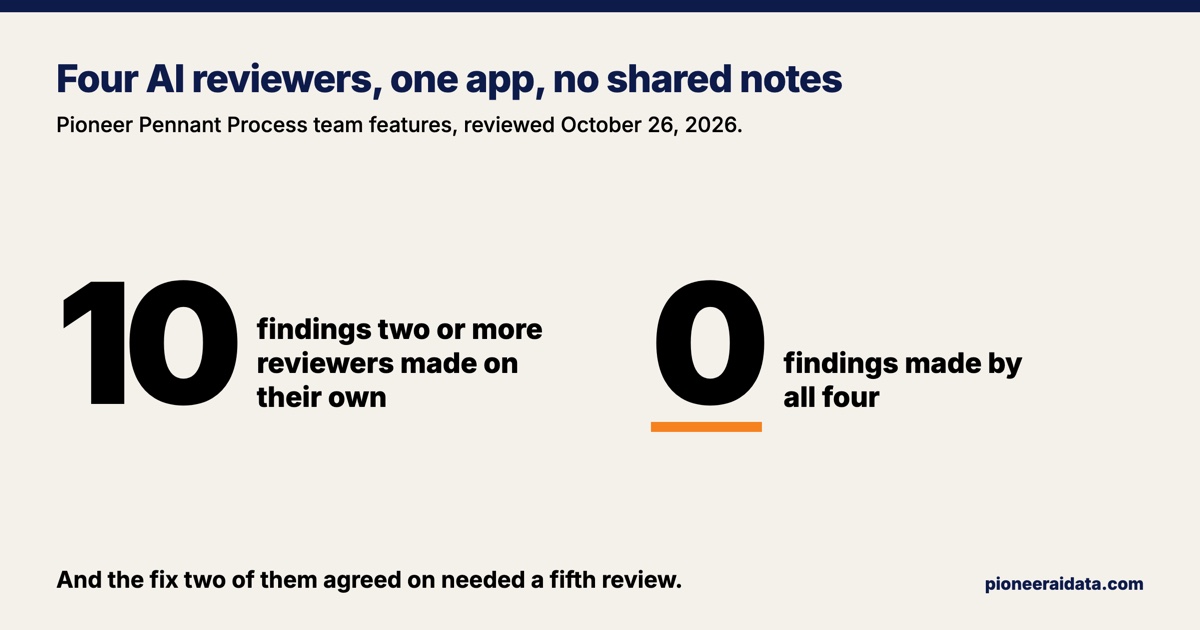
The way to review your website with AI is the way usability experts have reviewed software since the 1990s: several reviewers, each working alone with its own job, and nobody compares notes until everyone is done. One AI reviewer gives you a sample of what is wrong, not the whole list. In October 2026 I sent four AI reviewers through Pioneer Pennant Process, my college softball recruiting app, to look at its new features for travel teams. Not one finding came from all four reviewers. Ten came from two or more of them, and the first fixes were live about two and a half hours after the reviewers started.
I build and run AI systems for small businesses at Pioneer AI & Data, and the AI and data work runs on one rule: whoever built a thing is never its only reviewer. This post is how that rule works when the reviewers are AI, with the counts from one real review.
Search results for this question mostly offer one AI tool that scans the whole site, followed by a reminder to test with people. Neither the tool nor the reminder tells you how many reviewers to run, or what it means when two of them agree.
How to review a website or app with AI, step by step
An AI usability review works best as several separate reviews of the same copy of your site, merged at the end. Here is the method I use:
- Give each reviewer its own copy and made-up data. Use a copy of the site that is not the live one, filled with invented customers, so no reviewer can change anything real or read anyone's private records.
- Give each reviewer one lens. A customer, the person who runs the site day to day, design and accessibility, and the business case are four lenses that cover a lot of ground.
- Keep the reviewers apart. Each one works in its own session and never sees another's report until all of them are finished.
- Ask for evidence with every finding. A screenshot, a measurement, or the line of code that causes it, plus a severity and a suggested fix.
- Merge the reports by cause. Two reports describing the same broken button in different words are one finding, found twice.
- Check each finding before fixing it. Open the screenshot or the code, because an AI reviewer will sometimes report a problem that is not there.
- Fix what two reviewers found first, then read the single findings one by one. Agreement tells you a problem is real. It does not tell you a problem is the only one.
- Review each fix with a reviewer that did not write it.
The rest of this post is that method run once, on October 26, 2026.
Why one AI reviewer is not enough
A single reviewer misses most of what a group finds, and that was true of people long before AI. Jakob Nielsen reported in 1994 that "single evaluators found only 35 percent of the usability problems" averaged over six of his projects, and he recommended three to five evaluators, each inspecting "the interface alone." Nielsen Norman Group's 2023 guide gives the same advice: three to five people, and nobody sees another's evaluation until their own is complete.
Has the newest generation of AI fixed this? The published research tested 2024 and 2025 models, and it is mixed. A 2025 study accepted at the INTERACT conference found that GPT-4o caught 21.2% of the issues human experts found, while also finding 27 new ones and reporting some problems that were not there. A second 2025 study, not yet peer reviewed, found that an AI review caught 73% and 77% of the issues in two apps, more than five experienced human reviewers at 57% and 63%, but it struggled with design conventions and with problems that span several screens. Neither study shows one AI reviewer catching everything, and both show it catching a different set of problems than people do.
Anthropic reported the same pattern on a different task in July 2025: one auditing agent found the root cause of a model's hidden problem 10 to 13% of the time, and an agent that started from ten separate runs' reports found it 42% of the time.
My own review ran on a current Claude model in October 2026. Its four reviewers had different jobs, so some difference was built in, but the size of it is the point: no single finding appeared in all four reports, and the whole accessibility batch appeared in only one.
The setup: four lenses, four copies, a made-up team
The four reviewers were separate AI agents, each with its own private copy of the app at the same version, seeded with a made-up team of 12 players with 3 events played and 4 coming up. Nothing touched the live site or payments, and the team and its families were invented. The four lenses were the coach's side, the family's side, visual design and accessibility, and the product and its market.
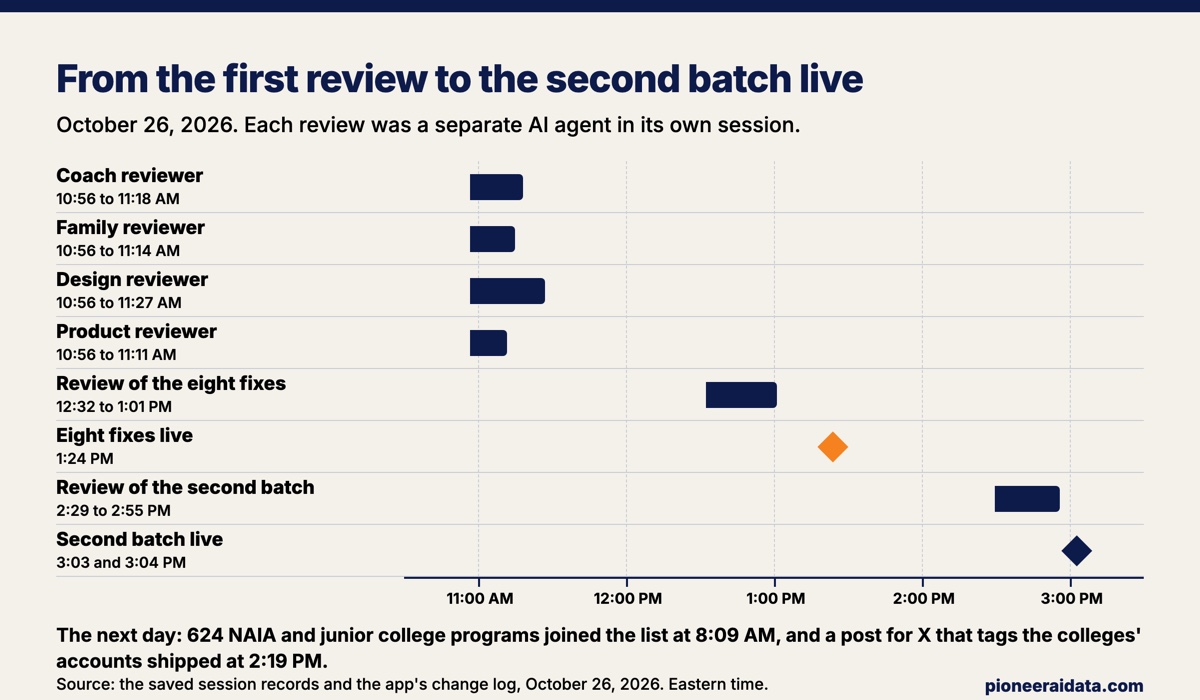
All four reviewers started at 10:56 AM on October 26, and none read another's work. The fastest finished in 15 minutes, and the slowest, the design reviewer, finished in 30. Between them they made 536 tool calls before reporting: loading pages, walking through a coach's and a parent's jobs, taking screenshots at phone and desktop widths, and reading code. The design reviewer alone visited 30 pages as six different logins and ran an automated accessibility checker on every one.
One limit belongs up front: all four reviewers ran on the same AI model. A September 2026 paper on auditing AI systems puts it plainly: a reviewer that shares the reviewed system's model family "fails with it." The AI session that built the fixes ran on that same model too, which is the paper's own case. Four agents on one model work separately, but they are not as independent as four people, so they can share blind spots even when they never see each other's reports.
What it means when two AI reviewers find the same thing
Agreement between separate reviewers is the best evidence that a finding is real, so the shared findings get fixed first. Ten findings came from two or more of the four reviewers: four were found by three reviewers and six by two. Each of the ten was checked against the code or a screenshot before anything changed.
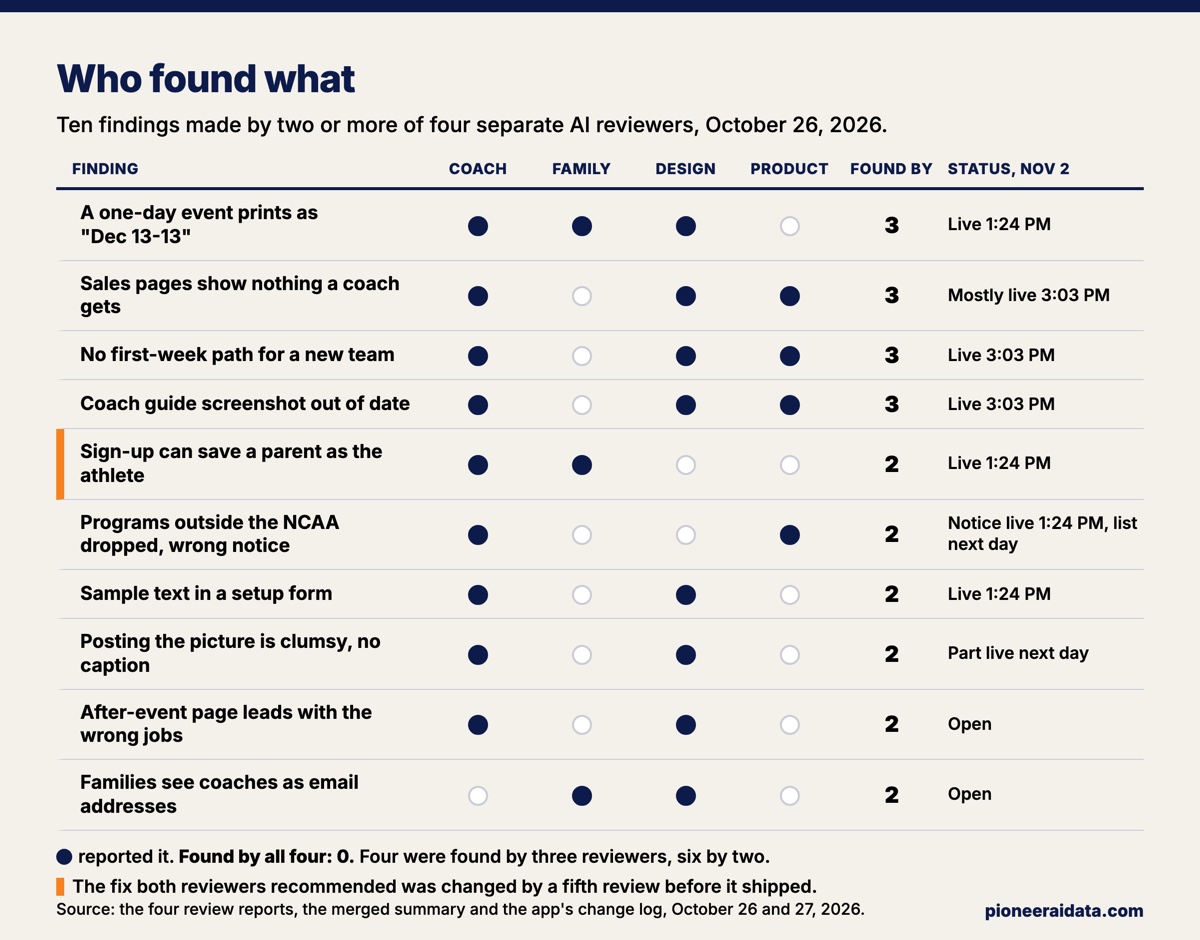
The strongest of the ten was found two different ways. The family reviewer filled in the sign-up form, left the consent box unchecked on purpose, and watched the "Who is setting this up?" choice snap back from "A parent or guardian" to "The athlete" when the form came back with its error. The coach reviewer never touched that choice and landed in the same place. Either way, the test parent was saved as the athlete, and a family in that spot could not turn on sharing with the team's coaches without writing to support or starting over. Two reviewers with different jobs took different routes to one cause.
Three reviewers each caught a one-day event printing as "Dec 13-13," including on the profile sheet families hand to college coaches. Two reviewers measured the page a coach opens after a tournament and found the thank-you picture, the job the coach came for, about 5,300 pixels down on a phone. Their measurements differed by 25 pixels, which is what two honest measurements of the same page look like.
Matching findings across reports takes judgment, so count them by cause rather than by wording. The merged summary counted ten shared findings. Rereading the four reports for this post turned up two more pairs that the summary had credited to one reviewer, because the second reviewer described the same button and the same table in other words. Ten is a floor.
The finding only one reviewer made
The accessibility problems came from the design reviewer alone, because no other reviewer was asked to look for them. Accessibility is whether a site works for someone using a screen reader, a keyboard, or weaker eyesight. The design reviewer found that the app's usual form markup places a label beside its field without tying the two together, a pattern it counted 194 times in the code. An automated checker found 17 unnamed fields on the page a coach opens after a tournament, including all 15 thank-you boxes, which a screen reader announces only as "edit text." The gray used for hint text measured 4.36 to 1 against white, under the 4.5 to 1 minimum that the WCAG accessibility standard sets for normal text.
Low-contrast text and missing form labels are two of the three most common accessibility failures on the web. WebAIM's 2026 scan of the top million home pages found low-contrast text on 83.9% of them and missing form labels on 51%. A review without an accessibility lens will usually miss both, because nothing on the screen looks broken. The accessibility batch is on this app's list and has not shipped yet.
Single findings mattered in the same day's fixes too. Two of the eight fixes that shipped that afternoon came from findings only one reviewer made at all. Only the design reviewer saw the whole thank-you picture stay blank while one slow college logo loaded, and only the coach reviewer saw that the panel showing which players still owe a thank-you undercounted. Fix the overlap first, then read every single finding. Agreement measures how sure you can be, not how much is wrong.
Review each fix with a reviewer that did not write it
A fix needs its own reviewer, because a fix two reviewers agree on can still be wrong. Both reviewers who found the sign-up trap recommended the same fix: when a family arrives from a team's invitation link, start the form on "A parent or guardian." I said yes to eight small fixes, an AI session built them, and a fifth agent that had not written them reviewed them from 12:32 to 1:01 PM.
The fifth reviewer found the hole in the agreed fix. With the parent choice filled in, a player who signed up herself and left it alone would become a parent login, and a parent login can turn sharing on. The shipped form starts on "Choose one" and refuses to go through until someone chooses, which is the alternative the coach reviewer had offered in passing. The fix reviewer also found a second medium problem and six small ones, all fixed, plus one cost note left as it was, and its final pass found nothing new.
The eight fixes went live at 1:24 PM with 22 new tests. Fourteen of the first 19 were run against the old code first and failed there, which is how you know a test checks the bug it names. The second batch, which put the team plan on the front pages and gave a new team a first-week checklist, went live at 3:03 and 3:04 PM after its own separate review. By 3:04 PM, seven of the ten shared findings had a fix live, two of them in part. The next morning the colleges outside the NCAA joined the app's list, and that afternoon a ready-made post for X that tags the colleges' accounts covered part of an eighth finding. Two of the ten are still open.
The same habit applies to code an AI writes, which I covered in how I review AI-generated code before it runs. This post is the version for what a customer sees.
What AI reviewers cannot tell you
An AI reviewer can count taps and measure pixels, but it cannot feel a parent hesitate. The coach reviewer kept that line clear: it counted the Sunday thank-you job at about 48 actions for 12 colleges, and it marked its 10 to 15 minute estimate as inferred, its word for an estimate. Treat any timing or "users will feel" claim from an AI reviewer the same way, and lean on its counts, which are what it measures well.
Separate AI reviewers also do not replace the people the site is for. Four agents on a made-up team found where the product could trip a family up, and real families using it are the test an AI review cannot replace. The review makes that test cheaper by clearing the obvious traps first. The AI proposes, and a human decides what ships, which here meant me saying yes to each batch.
Run your own AI usability review
Pick three or four lenses that match the people who use your site: a customer, whoever runs it day to day, accessibility, and the business case. Give each reviewer its own copy, made-up data, and a request for evidence. Merge by cause, fix what two reviewers found, read every single finding, and review the fixes before they ship. On my app the four reviews took 30 minutes side by side. The checking and fixing took the rest of the afternoon, and that part is the review.
Want this run for your business?
Book a free discovery call. We map where AI fits, show you the numbers, and point you to the right plan. No pressure, no jargon.
Book a Discovery Call →