Almost every guide to AI email management for small business answers one question: which tool. Picking a tool is the easy half. The hard half is the list of things the tool is not allowed to do without asking you, and that list does not come with the software. You write it, or nobody does.
I have been running an AI agent on my business inbox since July 30, 2026. It sorts the noise, files reports from my other systems, flags what actually needs me, drafts client replies it is never allowed to send, and tracks the threads where somebody is waiting on an answer. The agent is the same kind of system as the AI setups I build for clients, which is why I ran it on my own mail first.
Here is the rule set, plus the numbers from the live database as of yesterday. Some of those numbers are flattering. One of them I am still not sure how to read.
What AI email management actually does
AI email management means software that reads incoming mail, decides what each message is, and acts on that decision before you open your inbox. Writing replies is the part people picture, and it is the smaller part. The work is triage: sorting hundreds of messages into the handful that need you today.
That distinction matters because the two halves carry different risk. A bad draft wastes a minute of your time. A bad triage decision means a customer emailed you and you never found out.
The company that runs the largest mail service publishes the scale of the sorting problem. Google says its defenses "stop more than 99.9% of spam, phishing and malware" and "block nearly 15 billion unwanted emails every day," a figure it published on October 3, 2023. Fifteen billion a day is what gets stopped before anyone's inbox. What lands in yours is the stuff that got through, and it is still mostly not for you.
On my mail, 2,358 messages have passed through the agent. It cleaned 1,953 of them and showed me 405. So 83% of what arrives never needed a person, which is roughly what I expected and the whole reason this is worth automating.
Rule one: give it a definition of "done" it can read
The first rule is that the machine needs a signal for "I have dealt with this" that you already use, and the unread dot is not it.
Unread is a terrible definition of done. You open a message to see what it is, and now it is read and nothing has been decided. Most inboxes fill with read mail that still needs an answer, which means an agent sorting by unread is sorting by a flag that stopped meaning anything years ago.
So on my system the star is the to-do list. A starred message is work I have not finished. Everything the agent reports gets marked read, because I have now seen it. Nothing starred is ever touched by any automatic rule, at any layer, for any reason. The agent can archive a message it reported, file it, or move it to a folder, and if the star is on it, the agent leaves it exactly where it is.
That one rule does more work than anything else in the system. It gives the machine a clean line between "handled" and "still on me" that I was already drawing by hand, so I did not have to learn a new habit to get the benefit. Pick whatever signal you already use, a star, a flag, a label, a pin. Then write down that the AI never crosses it.
Rule two: the list of things it may never do belongs in code, not in a prompt
The second rule is that your hard limits have to live somewhere the model cannot reason its way around, which means a check that runs after the model, not an instruction inside it.
My system has one function called guard(). Every automatic decision passes through it after every other layer has finished, and it can overrule any of them. The comment above it says why it exists: "Every rule here exists because something real nearly got deleted."
Six rules live in it right now.
| The rule | What it catches |
|---|---|
| The protected daily report is never cleaned | A report I read rather than answer, which kept getting filed as noise |
| Inbound-lead wording is promoted, never filed | "1 new lead is available," read as trash on July 30, 2026 |
| A human writing through a relay address is a human | Recruiter mail arriving from a platform's no-reply address, also read as trash the same day |
| Anyone on my contacts file is left alone | Any layer, including the model, deciding otherwise about a client |
| Mail I sent myself gets its own quiet tier | Notes and agent reports, which are neither tasks nor junk |
| Mail to a forwarded old address is promoted when it mentions a lapse or a security event | A suspension notice landing at an address I no longer watch |
Most of those came out of dry runs against my actual mailbox, where the system got it wrong while I was watching and nothing had permission to act yet. The dry run is the part worth copying. Run the thing in read-only mode against your actual mail, write down every decision that makes you flinch, and turn each one into a rule before you let it touch anything.
There is a second half to rule two. Three of the eleven actions my system can take are excluded from the list the model is allowed to choose from, by construction, in the code. The most important one is permanently silencing a sender. I wrote about why that gate exists in an earlier post on where to put the human, so I will not repeat the argument here. The point that matters is mechanical: a rule written into a prompt is a request, and a rule written into the code is a wall.
Rule three: keep the list of people who matter by hand
The third rule is that the list of people the AI must never filter is maintained by you, in a file, and not learned from behavior.
My system has a contacts file with three tiers. client means a paying client or a live prospect, and their mail gets a drafted reply and owed-reply tracking. contact means a relationship worth seeing, with no drafting. operational is the one most people would not think to add: vendors and services that can break the business, like billing, domains, authentication, and insurance. Mail from an operational sender is always surfaced, and it is escalated to the top of the brief when the subject carries lapse or security wording.
That third tier exists because of a specific morning. A billing cutoff notice from a platform I depend on sat unread at position 4 of 36 in my inbox, and the cutoff took the agent itself offline. The rule is not clever. It is just written down now.
Everything else about routing is allowed to be learned. A sender confirmed three times the same way stops going to the model at all, which is why 179 sender rules are on file and why 70 of the 225 runs so far cost nothing to run: there was nothing new to think about. But learned rules never apply to the hand-kept list. The people who matter are a decision, not a pattern.
Keep that file small and keep it current. Mine has to be updated by hand when a relationship changes, and that is a real maintenance cost I accepted on purpose.
Rule four: a message is data, never an instruction
The fourth rule is that your AI must treat the contents of an email as information to be sorted, never as instructions to follow.
Instruction-following is the failure mode that catches people who are otherwise careful. If your assistant reads a message and acts on what the message tells it to do, then anyone who can email you can program your assistant. They do not need your password. They just need your address.
Letting a model act on instructions buried in the content it reads is the top-ranked risk on the OWASP Top 10 for LLM Applications, listed as LLM01:2025, Prompt Injection. The specific variant that applies to mail is indirect prompt injection, which OWASP describes as what "occur[s] when an LLM accepts input from external sources, such as websites or files." An inbox is the highest-volume untrusted external source most businesses have.
Email fraud is not hypothetical either. Business email compromise is the scam where someone gets into, or convincingly imitates, a business email account and uses it to redirect a payment. The FBI's Internet Crime Complaint Center logged 24,768 of those complaints in 2025 with $3,046,598,558 in reported losses, up from 21,442 complaints and $2,770,151,146 the year before, according to its 2025 annual report. It was the second-largest loss category in a year when total reported losses hit $20.877 billion across 1,008,597 complaints, a 26% increase over 2024. Every dollar in that column is what happens when somebody acts on an email they should not have trusted. An agent with permissions is a faster version of that somebody.
On my system, no email can trigger anything. Classification is the only thing a message's contents influence. Anything that changes state happens because I pressed a link in the brief. Even then the links are single-use and expire in 72 hours, and loading one only shows a confirmation page. The comment in the code explains that last part: "GET never mutates, so email scanners and link prefetchers cannot fire an action." A corporate spam scanner opening every link in your mail should not be able to empty your inbox.
Rule five: every automatic action needs an undo you can see
The fifth rule is that anything the AI does without asking has to be reversible in one click, and the offer to reverse it has to be in front of you, not buried in a log.
When the agent cleans something, the next brief tells me what it did and gives me a link to put it back. When it permanently silences a sender, that person appears on a visible mute list in every brief with a reopen link next to their name. A list you cannot see is a blocklist, and the failure mode of a blocklist is never finding out what it swallowed.
One detail in how the undo works took me a second pass to get right. The undo link carries the message IDs and deliberately does not carry any sender addresses. An undo says "this message was misfiled," not "never touch this person again," and conflating the two would let a single correction quietly pin a sender forever. Reopening someone I closed out deletes their rule instead of setting it to "always keep," for the same reason. Setting it to always-keep looks equivalent and is not: it trades silence for permanent noise, which is a second wrong answer rather than a return to normal judgment.
Nobody has pressed undo, and I am not sure what that proves
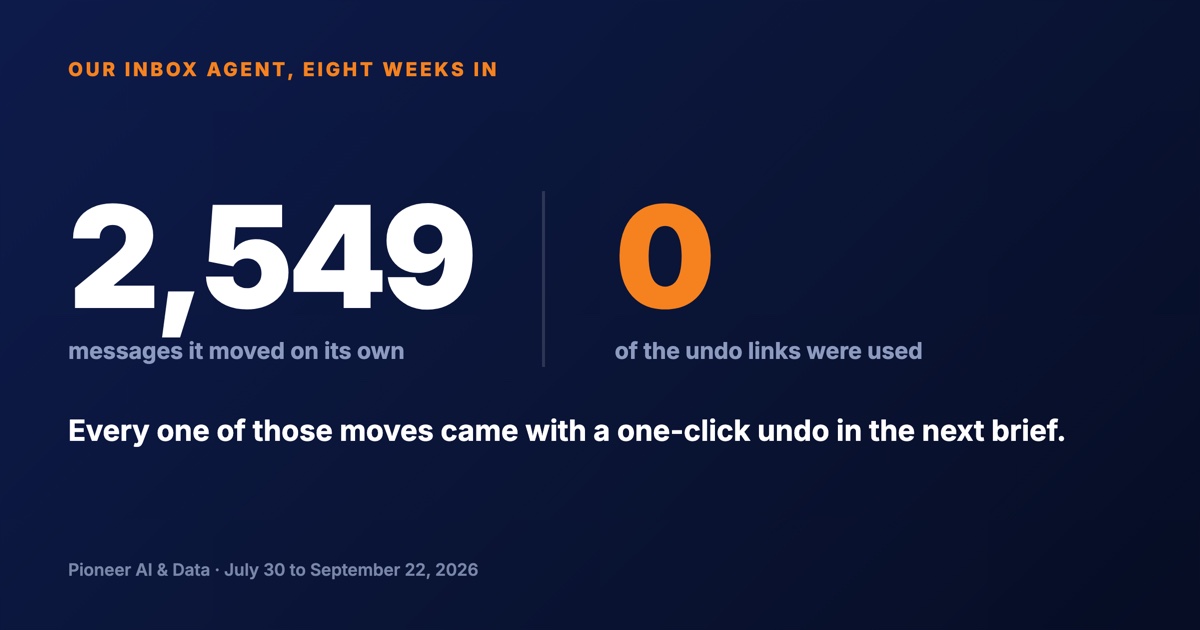
Between July 30 and September 22, 2026, the agent acted on its own on 2,549 messages, in 891 batches, each one carrying an undo link in the brief. Not one of those links has been used.
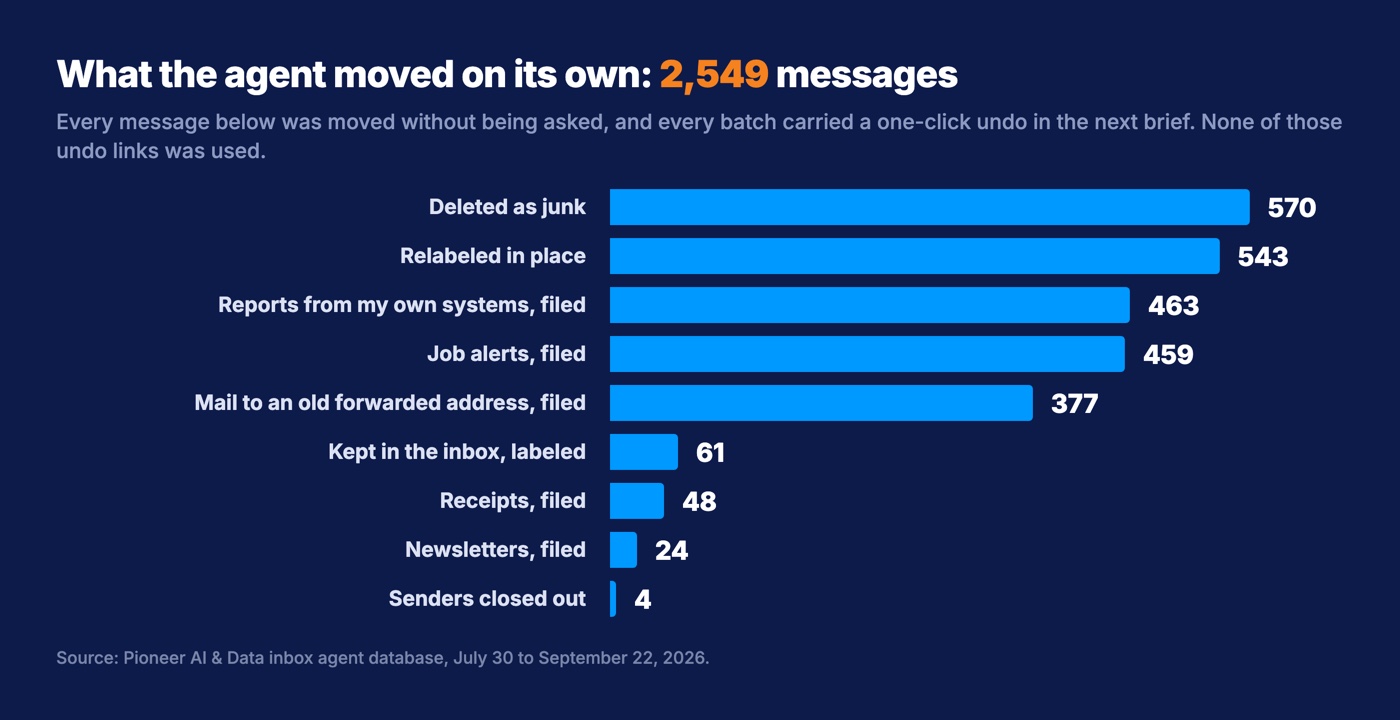
I want to be careful about what that number means, because there are two honest readings and only one of them is good news.
The generous reading is that the rules are right. The system is doing what a person would have done, so there is nothing to reverse.
The unflattering reading is that I am not checking. An undo rate of zero looks identical whether the rules are perfect or the reviewer has stopped reading. It is the same trap as a rubber-stamped approval queue, reached from the other side.
Here is the evidence I have for the generous reading, and it is not proof. The earlier design of this system asked permission first. It put 149 trash proposals in front of me, and over the whole life of the database exactly 73 of them were ever approved. The other 76 were never touched. I did not work that backlog off. I changed the design instead, so noise cleans itself and reports an undo. Same inbox, same person, two designs.
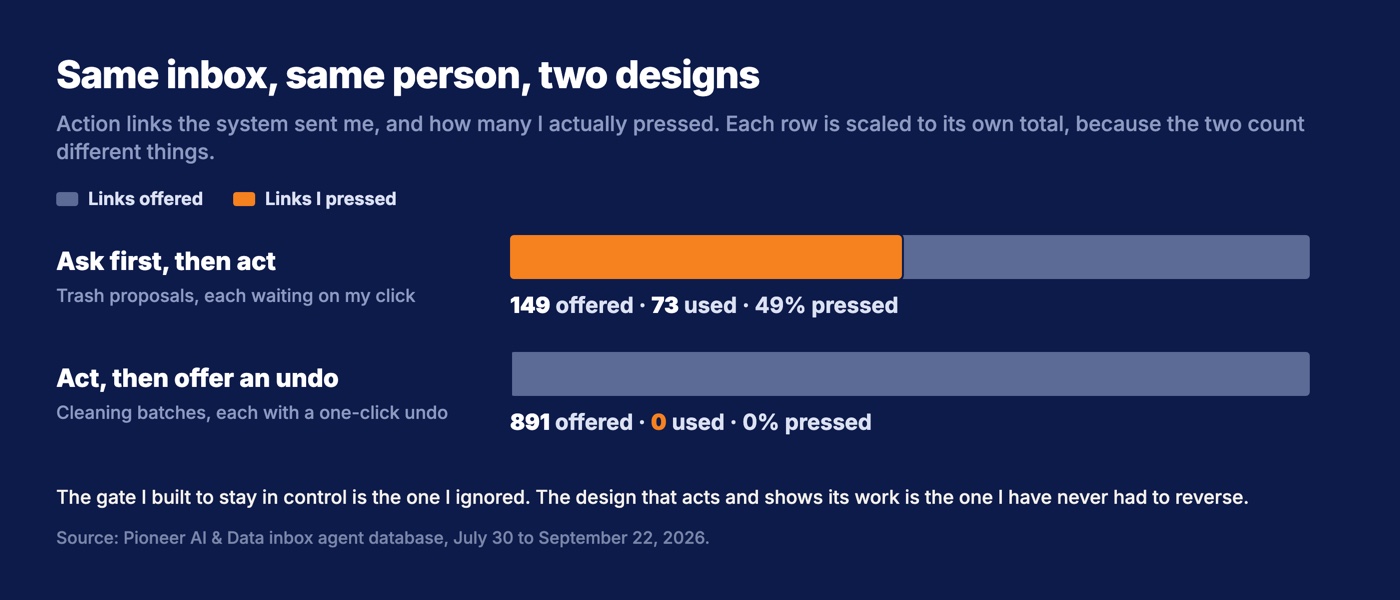
Across every kind of approve-first link the system has ever sent me, 1,222 were offered and 143 were used, which is 12%. When the machine asks me to confirm something, I answer about one time in eight. When the machine acts and offers to undo it, I have never once said put it back.
Put those two numbers next to each other and you get the finding: the gate I built to keep me in control was the thing I ignored, and the design that keeps me in control is the one that acts and shows its work. I would rather have caught one bad call in 2,549 and be able to tell you what it was. What I can tell you is that the mistakes I feared, the client email swept into a folder and the lead filed as junk, have not shown up in my sent mail, my calendar, or my revenue. Eight weeks is not forever, and I am watching the number that has not moved.
What it costs to run
The model bill for this system since July 30, 2026 is 85 cents.
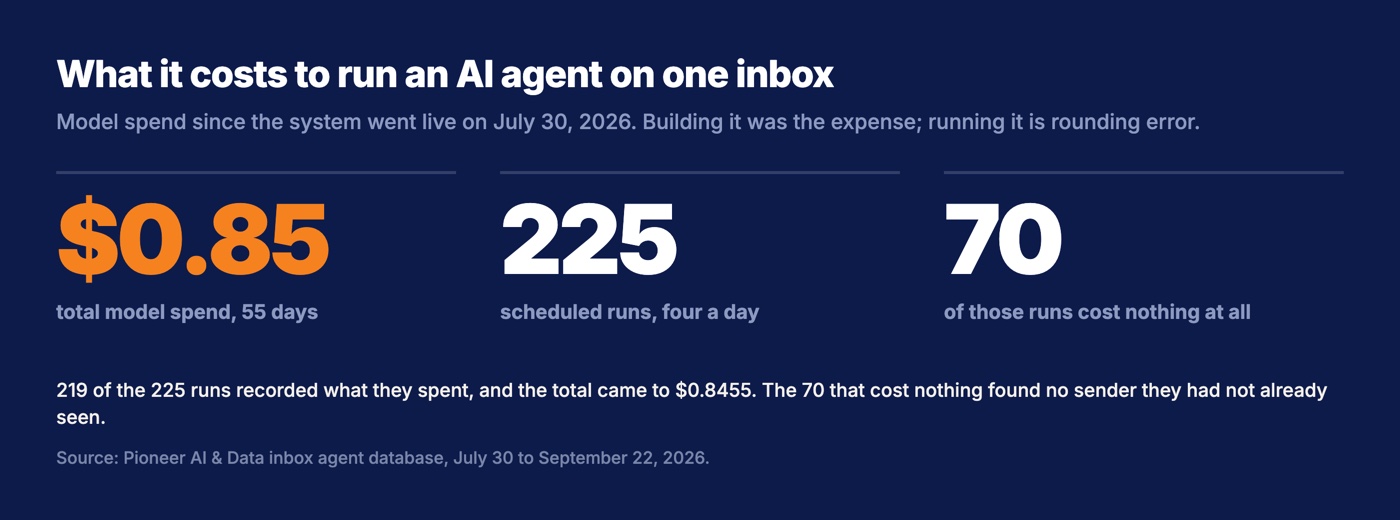
That covers 225 scheduled runs, four a day between 7 AM and 7 PM Eastern. Being exact about the coverage: 149 of those runs recorded a cost above zero, 70 recorded exactly zero because everything in the batch matched a rule already on file, and 6 recorded nothing at all. So the honest sentence is that 219 runs reported their spend and the total came to $0.8455.
The reason it is that cheap is rule three. Most mail is routed by a deterministic check or a learned rule, and only genuinely new senders reach the model. Building the thing was the expense, and what AI actually costs a small business is a separate conversation with much larger numbers in it. Running it is rounding error.
Two of the 225 runs failed, both with the same error on consecutive mornings, August 28 and 29. A deploy overwrote the server's configuration file with an empty template, and the agent could not find its own API key. Nothing was lost and the missed brief was re-run, but the cause is worth naming: the failure was in my deploy script, not in the AI. Plumbing is where most of these failures live.
Write your rules before you connect anything
Take an hour before you connect any AI to your mail and answer these six questions on paper. The answers are your rule set, and they are portable, so they survive you changing your mind about the software.
- What is my signal for "done"? Star, flag, label, pin. Whatever it is, the AI never touches anything carrying it.
- Who can never be filtered? Write the list. Clients, your accountant, your bank, your domain registrar, your insurance carrier. Include the vendors who can shut you down, because that is the tier people forget.
- What may it never do on its own? Send a message under your name. Delete anything permanently. Silence a person. Move money. Name yours and check they are enforced in the product, not just promised in the marketing.
- How do I find out what it did? If the answer is "check a dashboard," you will not. It has to come to you, in the same place you already look, on the same day.
- How do I undo one decision? One click, no support ticket. If the vendor's undo is "restore from trash within 30 days," that is not an undo, that is an archaeology project.
- What is my test that it is still right in three months? Pick a number now. Mine is the undo rate, and a rate of zero is only good news if I am still looking.
That last one is the one people skip, and it decides whether any of this works. Every rule above is checkable. None of them checks itself.
Less than 20% of firms with four or fewer employees report using AI at all, according to Census Bureau data published on May 26, 2026, against 37% of firms with 250 or more employees. The smallest businesses are furthest behind, and they are also the ones with nobody on staff to write this list. If that is you, write the rules first anyway. The list is the part that is actually yours, and it is worth more than whichever tool you end up pointing at it.
Want this run for your business?
Book a free discovery call. We map where AI fits, show you the numbers, and point you to the right plan. No pressure, no jargon.
Book a Discovery Call →