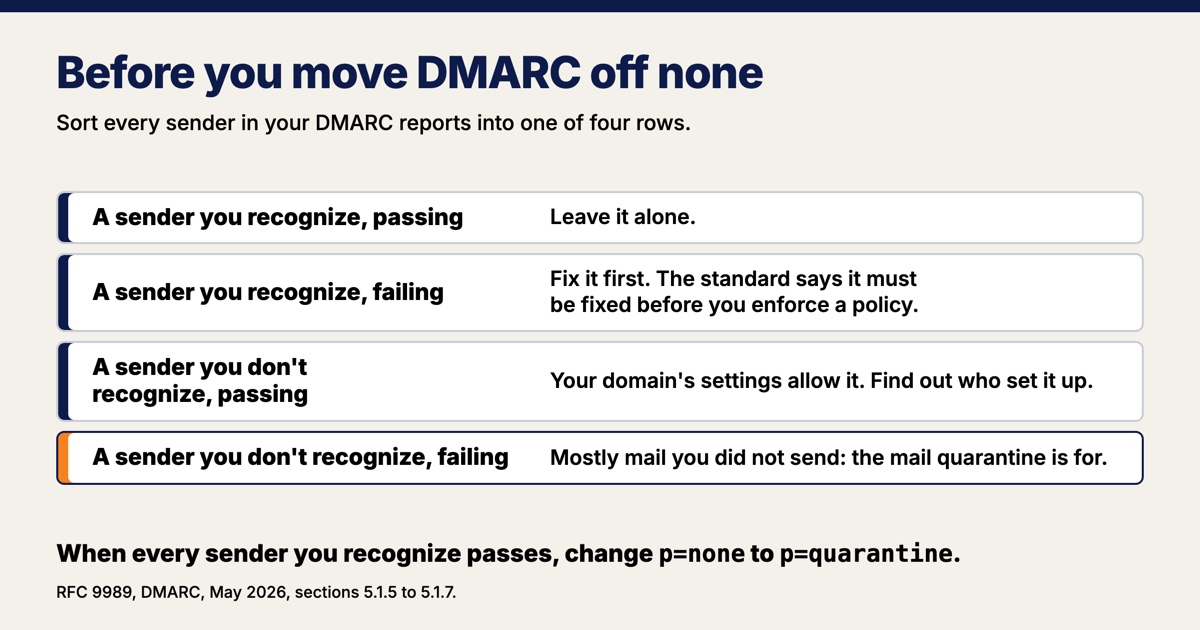
DMARC for a small business starts at none, the setting that only watches, and moves to quarantine once the reports show every sender you recognize passing. The record is one line of text in your domain's settings, and tightening it means changing one word. What takes time is reading the reports before you change it, because they tell you whether the stricter setting will catch strangers or your own invoices. At small business volume, give the reports a month, not a week.
Checking a business's email setup is the kind of work that fits inside Pioneer's AI and data work.
What DMARC does for a small business
DMARC tells other mail systems what to do with mail that claims to be from your domain and fails the checks, and it asks them to send you reports on what they saw. The DMARC record is a line of text in your domain's DNS settings, the records that tell the internet where your website and mail live. The two checks are SPF, a published list of the servers allowed to send for your domain, and DKIM, a signature your mail provider adds to each message. A message passes DMARC when either check passes in the name of the domain shown in its From line, according to RFC 9989, the version of the standard published in May 2026.
Gmail's and Yahoo's sender rules got stricter in 2024. Since February 1, 2024, Google's sender guidelines have required anyone sending more than 5,000 messages a day to Gmail to publish a DMARC record, though "Your DMARC enforcement policy can be set to none." Yahoo asks the same of its bulk senders: a valid record "with at least p=none." Below that line the record is optional, and it is still how you find out who else is sending mail in your name. The rest of Google's sender rules, and what they can do to a contact form, are in how to know your website is broken before a customer does.
None, quarantine and reject: what each DMARC setting asks for
The policy setting, written p= in the record, runs from none, which asks receiving mail systems for nothing, through quarantine, which asks them to treat failing mail as suspicious, to reject, which asks them to refuse it:
p=noneasks for nothing. In the standard's words, the domain owner "offers no expression of preference." Failing mail gets whatever treatment the receiver would give it anyway, and the reports still come.p=quarantinesays failing mail is "suspicious." At Gmail, per Google's rollout guide, that means "Messages that don't pass DMARC go to the recipient's spam folder."p=rejectsays a failure is "a clear indication that the use of the domain name is not valid." Google's description of what happens next: the mail is rejected by receiving servers "and never delivered."
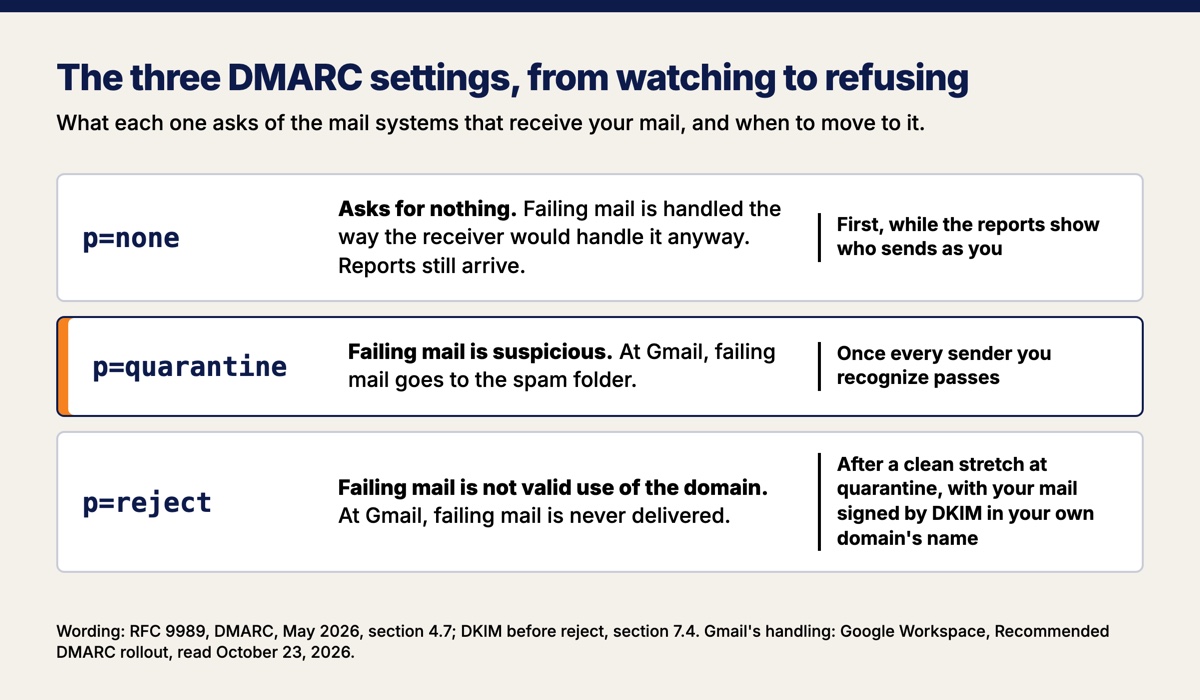
The DMARC standard's advice is to start at none. RFC 9989 says domain owners "usually start with p=none," a stage it calls monitoring mode, because "in all but the most trivial setups, a Domain Owner can overlook a server here or be unaware of a third-party sending agreement there." The end of the DMARC ladder is reject. When the federal government made DMARC mandatory for its own agencies, CISA's directive 18-01, issued October 16, 2017, gave them 90 days to publish none and one year to reach reject.
The May 2026 revision of DMARC dropped a setting many guides still recommend. Older advice, Google's rollout guide included, says to apply quarantine to a small percentage of failing mail first and raise it over time. RFC 9989 removed that percentage setting, because "the 'pct' tag was usually not accurately applied, unless the value specified was either 0 or 100." For testing, the standard now has a flag, t=y, that tells receivers you are still testing, with the expectation that failing mail gets the treatment one level below the policy you published.
How long to leave DMARC at none
Leave DMARC at none until the reports have shown every sender that mails in your name, and at small business volume, plan on about a month. Google's guide says to start at none "for one week," and that "One week is usually enough time for the daily reports to contain data representative of all your mail streams." The DMARC standard is more patient: "Depending on its cadence for sending mail, it may take many months" before a domain owner is sure all of its mail is covered. In one case RFC 9989 names a length. A domain whose people might post to mailing lists, and that still wants reject, should publish none "for at least a month," then quarantine "for an equally long period of time," and compare the results.
Small business volume is why a week of reports is thin. A service that sends once a month, such as an invoicing system or a newsletter tool, can miss a one-week window entirely. DMARC reports also count only mail that reached a system that sends reports back, so they show a sample of what you sent.
One small business domain's reports from September 8 to October 9, 2026 counted 25 messages, fewer than six a week: 24 sent through the domain's own mail provider and passing both checks, and 1 from a network in Indonesia failing both. Every sender the owner recognized passed.
The one question to answer before you tighten DMARC
Before you move off none, the reports have to answer one question: does every sender you recognize pass? Your mail provider will be in the reports. The senders that are easy to miss are the services that can send in your name, such as a newsletter tool, an invoicing or booking system, or a website contact form. If one of your own senders shows up failing, fix it first. RFC 9989 says legitimate mail that fails "MUST be addressed prior to any attempt" to enforce a policy.
A sender you do not recognize that passes needs a closer look too. Passing means it sends from a server or with a signature your domain's settings allow, so someone set it up, and you want to know who. Whatever fails after all that is mostly mail you did not send, plus the occasional forwarded or mailing-list copy of your own, and catching the first kind is the reason quarantine exists.
When every sender you recognize passes, change p=none to p=quarantine. Confirm the change with a public DNS lookup, then keep reading the reports, because reject comes after a clean stretch at quarantine.
Why a DMARC report email looks like an error
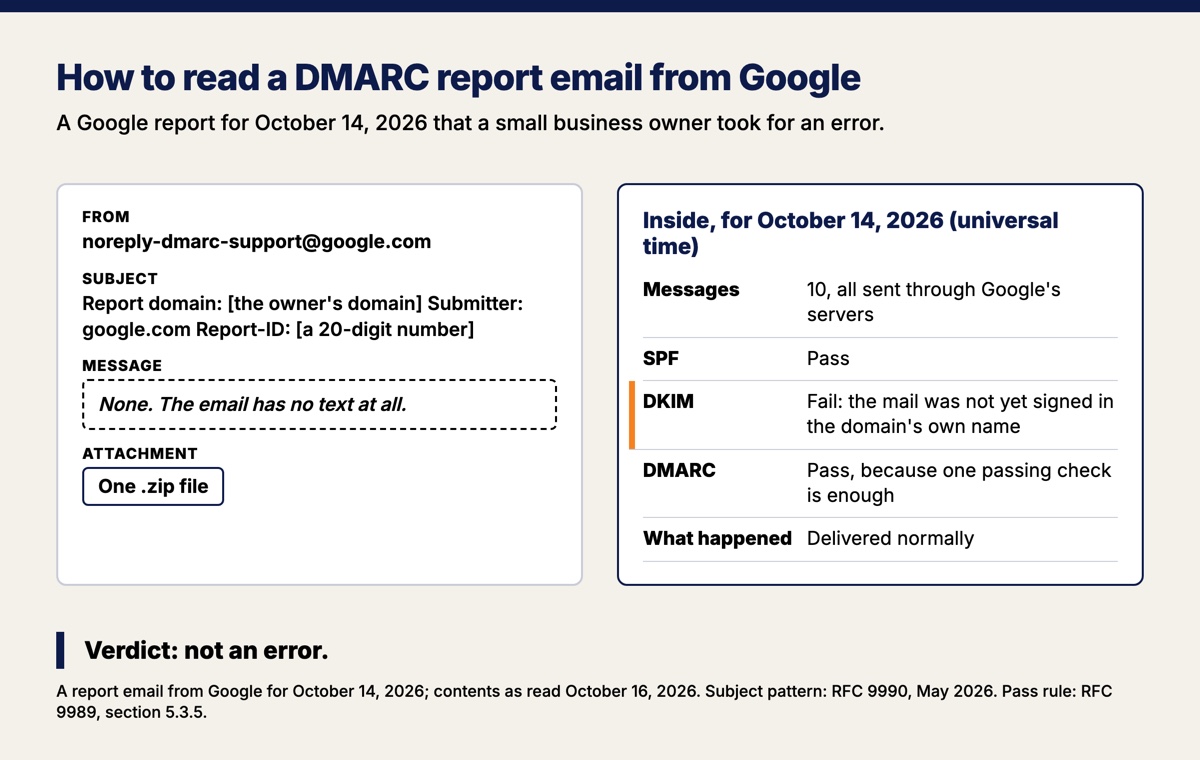
A DMARC report email looks like an error because it is written to be read by software. One that Google sent a small business owner for October 14, 2026 came from [email protected] with no message text, a subject line built around a 20-digit report ID, and a zip file, and she took it for an error. The subject follows a pattern set by the companion standard for reports, RFC 9990: your domain after "Report Domain:", the mail system that sent the report after "Submitter:", and an optional report ID. The report itself is a data file in an attachment, which the standard says should be compressed, and it typically covers "a single UTC day," one day in universal time.
A "dkim fail" line next to a DMARC pass does not mean the mail failed, because DMARC needs only one of its two checks to pass in your domain's name. In the October 14 report, all 10 messages came from Google's own servers, passed SPF and DMARC, and were delivered normally; DKIM failed only because the owner's mail was not yet signed in her own domain's name. Signing in your own domain's name matters before reject, because RFC 9989 says a domain at reject "MUST NOT rely solely on SPF" and must sign its mail with DKIM. For mail that runs through Google Workspace, the switch in the Admin console is called Start authentication, and Google's steps end with a test message whose header should show a DKIM pass.
Send the reports to a reader that turns them into a table. Even the DMARC standard says that while a person can read them, they are "formatted in such a way that it is recommended that they be machine-parsed." If your domain's DNS is on Cloudflare, its DMARC Management is one such reader, and it is "Available on all plans," including the free plan.
What DMARC does not stop
DMARC does not stop mail sent from a taken-over account, because that mail really does come from your domain and passes. The FBI's Internet Crime Complaint Center counted 24,768 business email compromise complaints and $3.05 billion in reported losses in 2025, the largest losses of any crime type after investment fraud, and it describes the crime as carried out "by compromising email accounts and other forms of communication." A stolen password sends real mail from a real account, and that mail passes every check DMARC makes. The protection there is multi-factor sign-in, which the same FBI report recommends "for all services to the extent possible, particularly for webmail."
DMARC also does nothing about fake display names or lookalike domains, because that mail never claims your domain at all. RFC 9989 lists "display name" attacks, where the From line shows your name over somebody else's address, as out of scope, and a lookalike domain one letter off from yours is a different domain with its own record, or none.
How to move your own domain off none
Moving a small business domain off none takes four steps and about a month:
- Publish a DMARC record at
p=nonewith a report address that points at a reader, so nobody has to open the files by hand. - Collect reports long enough to see every sender. Google says a week. At small business volume, plan on a month.
- Answer the one question. Does every sender you recognize pass? Fix any that do not before you go further, and track down any passing sender you do not recognize.
- Change
nonetoquarantine, confirm the change with a public DNS lookup, and read another month of reports before you change it toreject. Before reject, make sure your mail is signed with DKIM in your own domain's name, because RFC 9989 says a domain at reject must not rely on SPF alone. If anyone at your business posts to mailing lists, the standard advises against reject, and a domain that wants it anyway should run at quarantine at least as long as it ran at none and compare the results first.
Want this run for your business?
Book a free discovery call. We map where AI fits, show you the numbers, and point you to the right plan. No pressure, no jargon.
Book a Discovery Call →