An MCP server for a small business is a small program that lets an AI assistant like Claude or ChatGPT ask your business a question and get the answer from your own data, instead of reading your web pages and guessing. You need one when the useful answers sit behind a search box, a filter or a sign-in. You do not need one when the answers are already plain words on a page.
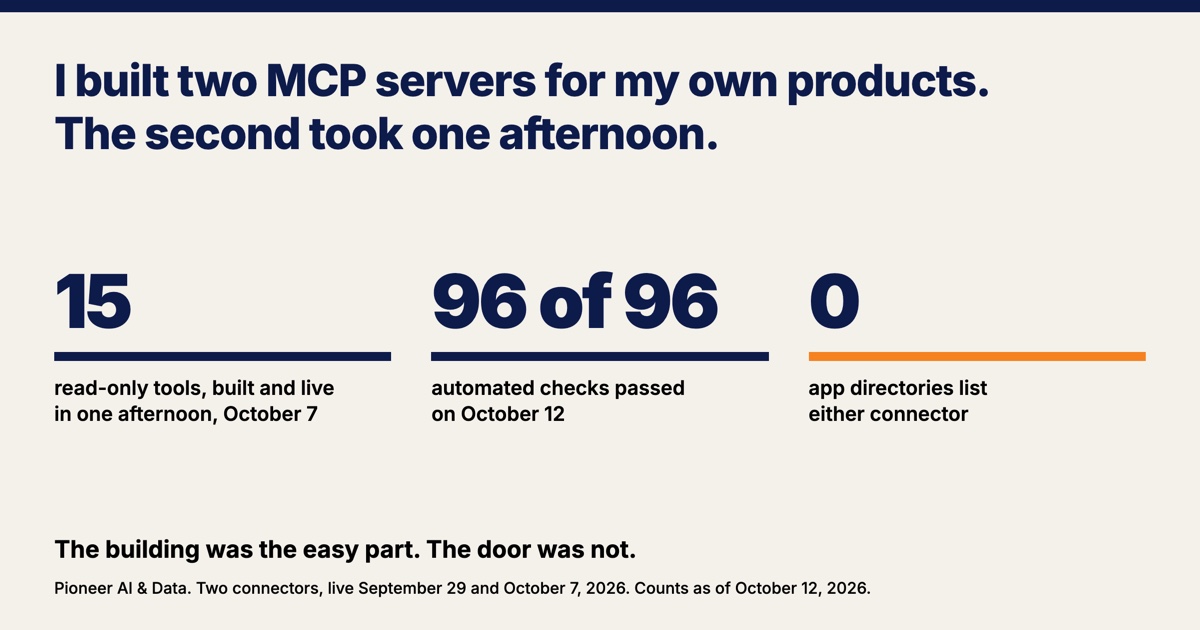
I have built two. The first went live on September 29, 2026 and has a sign-in. The second took one afternoon on October 7: 15 read-only tools on top of data I already publish. Neither is in an app directory as of this writing. The first went into ChatGPT's review and came back out, and the second has not been submitted anywhere. Making a business's data answerable is part of the AI and data work I do at Pioneer, so I ran it on my own products first. The building was the easy part, and most of this post is about the door.
An MCP server lets an AI assistant ask your data a question directly
An MCP server is a program that sits beside your data and answers questions from AI apps in a format the apps have agreed on. MCP stands for Model Context Protocol. Anthropic released the protocol as an open standard on November 25, 2024. On December 9, 2025 Anthropic donated it to a foundation under the Linux Foundation that Anthropic, Block and OpenAI co-founded. The donation announcement counted more than 10,000 active public MCP servers and named ChatGPT, Gemini and Microsoft Copilot among the products that had adopted the protocol.
An MCP server offers tools. A tool is one named thing an assistant can ask for, such as "find a team" or "list the leaders in a stat," with the inputs it accepts written down. Claude calls an MCP server a custom connector, and OpenAI's developer pages wrap one in a package they call a plugin. This post calls an MCP server a connector.
Being read comes before being asked. An assistant can already fetch a public web page, and I covered what a website needs for an assistant to read it in September. A connector is the second step, for the questions a page cannot answer.
The search results for MCP servers are almost all sellers: platforms that explain the idea and then offer a hosted one, and lists of servers to install. I did not find a page where a small business built its own connector from data it already publishes and reported what happened next.
The second connector took one afternoon because the data and the protocol code already existed
My second connector took one afternoon because its data was already published and its protocol code already existed. The data belongs to Pioneer Pennant Charts, a free site of college softball statistics that I build. The protocol code is a copy of the file my first connector runs. The Charts connector's code was committed at 4:14 PM on October 7, 2026, and its address was answering on the public internet at 4:15.
Four choices kept the Charts connector small.
- It reads and never writes. All 15 tools are labeled read-only. The Charts connector has no sign-in, and a caller can change nothing.
- One file feeds every answer. A script writes a single 1.9 megabyte file from the same files and functions that build the web pages. Nothing in the file is typed by hand, so an answer comes from the same numbers as the page. On build day all 3,885 hitter rows and all 1,364 pitcher rows matched the live site exactly.
- A machine checks it. Eighty-eight automated checks passed before the connector went live. On October 12 the same suite ran 96 checks and all 96 passed. One check fails if a dollar sign or the word "pricing" appears in the tool text or in a sample answer.
- The log keeps almost nothing. The connector's own log records which tool was called and nothing about who called it or what they asked. One address gets 600 calls an hour.
The finished Charts connector is five files and 2,278 lines, checks included. A business that already publishes its hours, services or schedule from one source has most of a connector's data ready.
A page read answered two of three test questions, and the connector answered all three
A plain page read answered two of three test questions on October 12, 2026, and the connector answered all three. The test was meant to show whether a connector is worth building when assistants can already read pages. The page reader was the fetch tool inside the AI session that helps draft these posts: it downloads a page, turns the page into text and hands the text to a small model. For the connector, the matching tool was called directly for each question, so the test measures what each route can deliver and not whether an assistant would pick the right tool. The third question asks about wRC+, a hitting stat where 100 is league average, in the SEC, one of the major college conferences.
| Question | Page read | Connector |
|---|---|---|
| What is a home run worth in runs? | 1.88 | 1.878 |
| Which home field boosts scoring the most? | New Mexico St., 1.24 | New Mexico St., 1.242 |
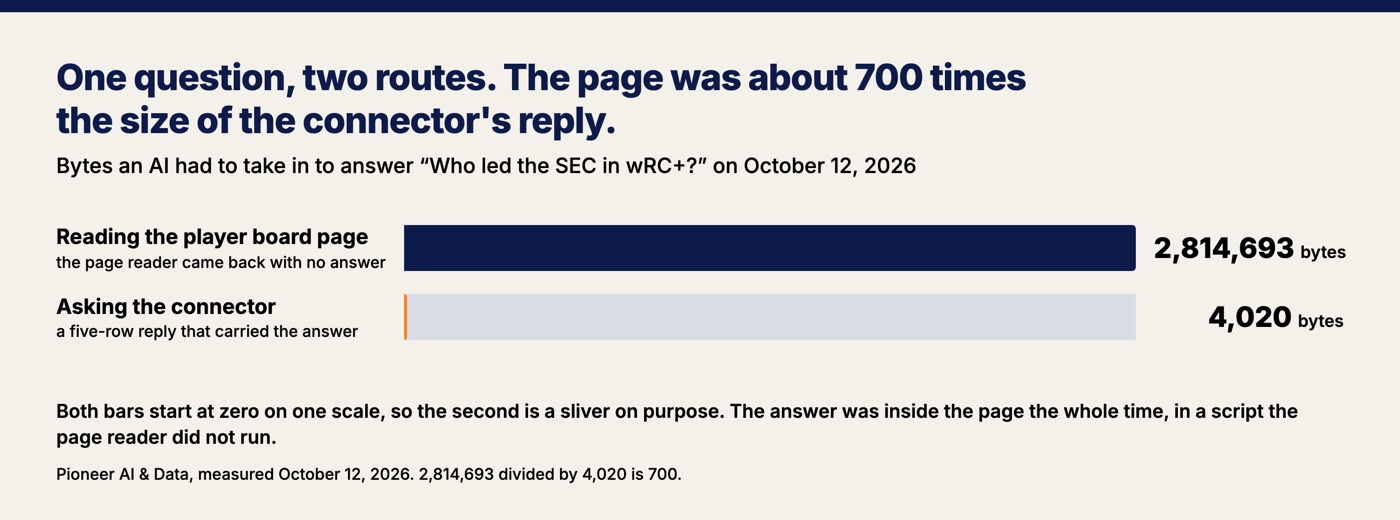
| Who led the SEC in wRC+? | Could not answer | Katie Stewart, Texas, 306 |
The two questions the page read got right live on ordinary pages with the numbers sitting in the text. The miss was the player board, which holds every player's row. The player board page is 2.8 megabytes and the answer to the wRC+ question is inside it. The page reader came back with the table's empty message instead: "No players match those filters." The player rows live in a script that a browser turns into a table, and a reader that does not run the script sees two tables with headings and no players in them.
The connector answered the wRC+ question in under half a second, with a five-row reply about 700 times smaller than the page.
Three questions, one reading tool and one day make a small test, and a consumer assistant with a full browser may do better on the player board. The rule I take from the test anyway: when the answer is a sentence on a page, the page is enough, and when the answer has to be looked up, filtered or ranked, the assistant needs something to ask.
My own bot protection turned the AI company away before my server saw it
The first failure at the door had nothing to do with my code: the bot protection in front of my website blocked OpenAI's servers. The block hit my first connector, the one with a sign-in. That connector belongs to Pioneer Pennant Process, a college-fit finder for softball families built on the school database I wrote up in September. I was adding the Process connector to ChatGPT on the morning of October 7, 2026. ChatGPT said "Some app settings were rejected," and the detail behind that message read: "Dynamic client registration failed: registration endpoint returned 403." Registration is the step where ChatGPT introduces itself to a server that has a sign-in, and a 403 is a web server's way of saying no. My server had no record of the request. Six requests from OpenAI had been challenged as bots before they ever reached my server.
A connector's callers are servers, not people, and a bot filter sees them for what they are. The filter was Cloudflare's Bot Fight Mode. Cloudflare's documentation calls it a free product that "may challenge API or mobile app traffic," meaning requests from software and not only from browsers, and says: "You cannot bypass or skip Bot Fight Mode using WAF custom rules or Page Rules." In plain terms, the free plan allows no exception for one path on a site. It allows an exception by address, and the list of addresses OpenAI publishes for its connector servers held 283 blocks on October 12. The remaining choice was a paid plan. I turned Bot Fight Mode off for that one site, and the next attempt went through about nine minutes after the first one failed.
A second filter is still on. A script using the Python language's default signature got a 403 from the same site on October 12, and a client with a different signature got through. The AI apps that have called my servers sent signatures the filter accepts. A developer's quick test script may not.
The directory review asked for more than the build did
Getting my first connector into ChatGPT's directory, where a person can add it with one click, took more preparation than building a server did. OpenAI's guidelines and submission page ask for a verified person or organization, a published privacy policy, a video walkthrough, a code hosted on your own domain, and "exactly five positive and three negative" test cases. A connector with a sign-in also needs a demo account that a reviewer can use without extra steps. The submission page gives no timeline for the review.
Four things went wrong on my side of that list. The connector had 17 tools when the review started.
- The package had two blockers before it was uploaded. The category in the package, "Education," is not a value OpenAI's submission portal accepts, and one required file was missing. Rereading the documentation on September 30 caught both.
- One tool had to become three. A tool that could add an item to a list, remove one, or move one up or down was flagged, because the guidelines' instruction is to "Expose each model-callable operation as a separate tool" and that tool held several. Splitting that tool took the server from 17 tools to 19 and cleared the finding.
- A test case failed because the assistant never called the connector. ChatGPT answered a recruiting-rules question from a web search without calling the connector, which was not what the test case expected, so the case was rewritten. The assistant decides when to call a connector, and the connector's owner does not get a vote.
- Two tools were held with no reason given. The automated scan said each tool "needs further review before it can go live." Both tools were reworded once, and one of them a second time. Across seven scans on October 7, one tool was held all seven times and both were held on six. The fields where the portal would explain a hold were blank.
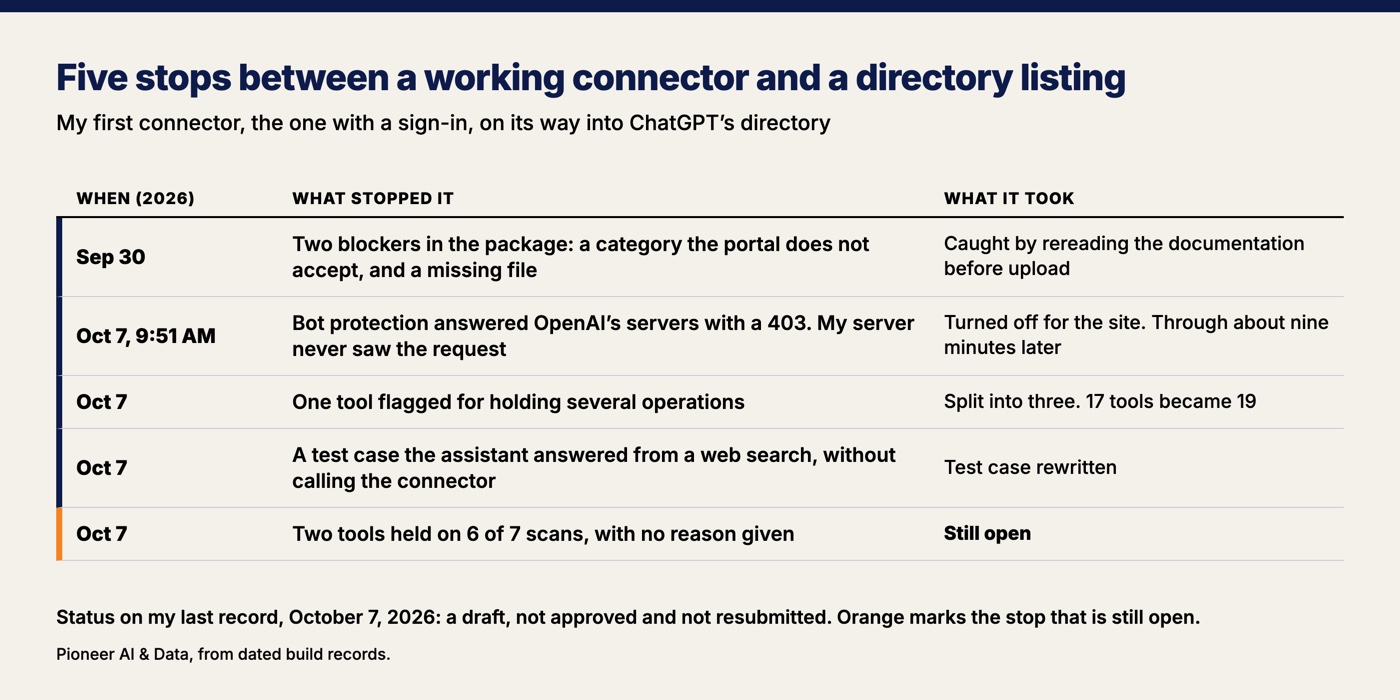
The listing was submitted early in the afternoon of October 7, 2026, and I had the review canceled at 2:06 PM so the two held tools could be corrected. As of my last record, on October 7, the listing is a draft, not approved and not resubmitted. Approval would not end the work either. The submission page says OpenAI "scans your hosted MCP server daily," and a new tool stays unavailable until it is approved.
The protocol changed in July, and neither server speaks the new revision
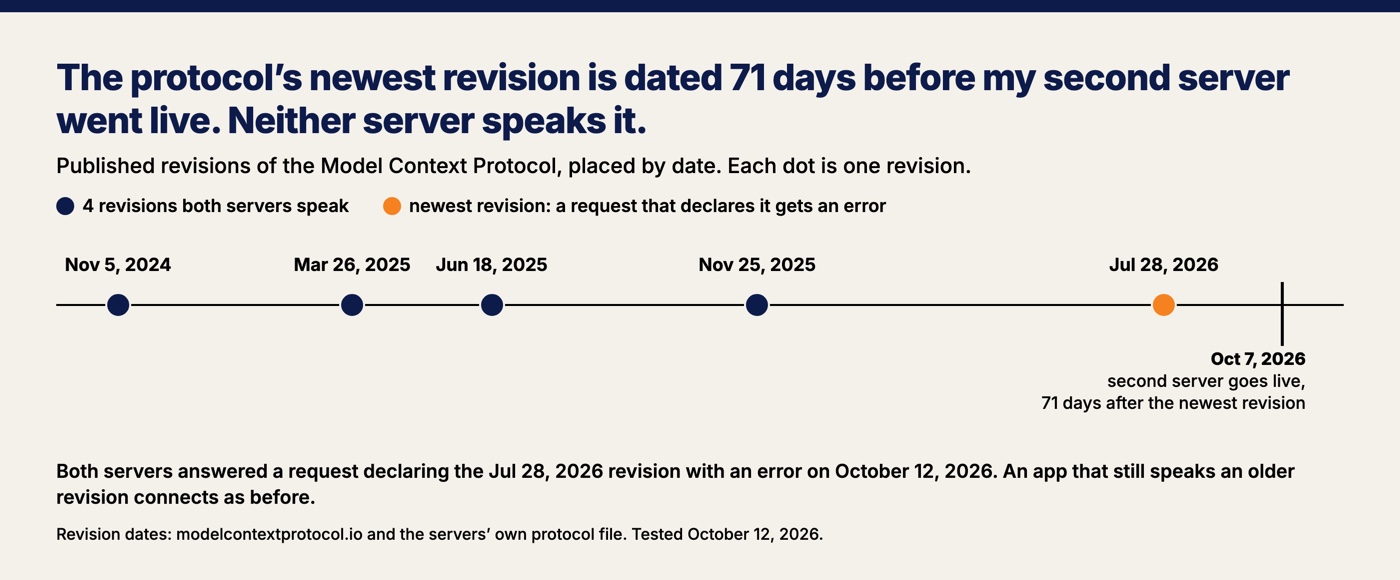
The newest published revision of the protocol is dated July 28, 2026, and neither of my servers speaks it, including the one built 71 days after that date. A revision is a dated version of the protocol's rules, and the gap turned up while this post was being drafted. The list of changes for the July revision says it removes the handshake, the opening exchange where an app and a server agree on a version before any question is asked. Under the July revision every request states its own version. Both of my servers run the same protocol file, and that file speaks four revisions, the newest dated November 25, 2025. On October 12 each server got a request that declared the July revision, and each answered with an error that begins "Unsupported MCP-Protocol-Version 2026-07-28".
Nothing I know of is broken so far, and the reason is in the specification. The specification's compatibility table says an app that speaks only the new revision fails against an older server like mine, and an app that speaks both works by falling back to the old handshake. Any app that has connected to my servers did it with the old handshake, because the old handshake is the only one my servers speak. The day an app drops the old handshake, my servers stop answering that app.
All 96 checks passed on October 12, and one of them is named "an unsupported protocol header is 400." That check sends a made-up date from 1999 and passes when the server refuses it. The July revision gets the same refusal. None of the 96 asks what the newest revision is.
The revision gap is the same lesson as the 50 things I have to keep alive. A connector is one more of those things, and the standard it depends on moves on someone else's calendar.
I cannot point to one outside user of the public connector yet
My notes record nobody outside my own tests using the public Charts connector through an AI app, and I have not read the web server's log looking for strangers. The Charts connector is in no app directory. The connector's address sits on a public page, and the callers I can prove are an uptime checker that pings the address every five minutes, the protocol's official client software and my own test agents on build day, and the tests run on October 12. I have not yet connected the Charts connector from my own consumer Claude or ChatGPT account.
Connecting is still awkward for a normal person. Claude's help center says custom connectors are available on its Free, Pro, Max, Team and Enterprise plans and that "Free users are limited to one custom connector." On ChatGPT I have one working connection on a paid consumer plan, made October 7, 2026 on the sign-in connector with a made-up test athlete, and the Free and Go plans have not been tested. On October 8 I said of the sign-in connector that it "still seems very weird to connect." A walk through my own help steps that morning found they named a Claude menu that had moved.
Connecting also asks for trust, and it should. The specification says AI apps must "obtain explicit user consent before invoking any tool," and Claude's help page tells users to connect only to servers built by organizations they trust. A connector without a listing asks a stranger to paste an address into their assistant on your word. A directory listing is the closest a small business gets to someone vouching for its connector.
What to decide before you build an MCP server for your small business
Six decisions settle most of an MCP server for a small business, and each one comes from a number above.
- Decide whether a page would do. Two of the three test questions were answered by reading a page. Build a connector for the answers a page cannot give.
- Start read-only, with what is already public. All 15 tools on the Charts connector only read, which is why that connector needed no sign-in and has nothing to undo.
- Serve the same source your pages use. One file, written by the same code as the site, is why 5,249 rows matched on build day. A connector that keeps its own copy of your prices will drift from your website.
- Test your front door with a server, not a browser. Your bot protection may block the AI company before your code runs. Mine did, and the free plan's only exception was an address list 283 blocks long.
- Write one tool per action and label each one. A tool that did several things cost me a finding and a rebuild. Keep prices, plans and promotions out of the listing and the tools, because the directory rules forbid them.
- Put the protocol on a calendar. My second server was a revision behind on the day it shipped, and every check passed. Somebody has to read the specification's list of changes a few times a year.
The afternoon of building was real. So is the count on the Charts connector five days later: 15 tools, 96 passing checks, one revision behind, and no outside user I can point to. If someone offers to build you a connector, ask them what happens at the door.
Want this run for your business?
Book a free discovery call. We map where AI fits, show you the numbers, and point you to the right plan. No pressure, no jargon.
Book a Discovery Call →