Search for how to measure AI ROI in a small business and every answer is the same formula: value created minus what it cost, divided by what it cost, where value is hours saved times your hourly rate. The formula is fine. The input is the problem. Every page that hands you that formula also hands you the hours, usually as a range like 30 to 50% time savings, and that is the one number you were supposed to go and measure.
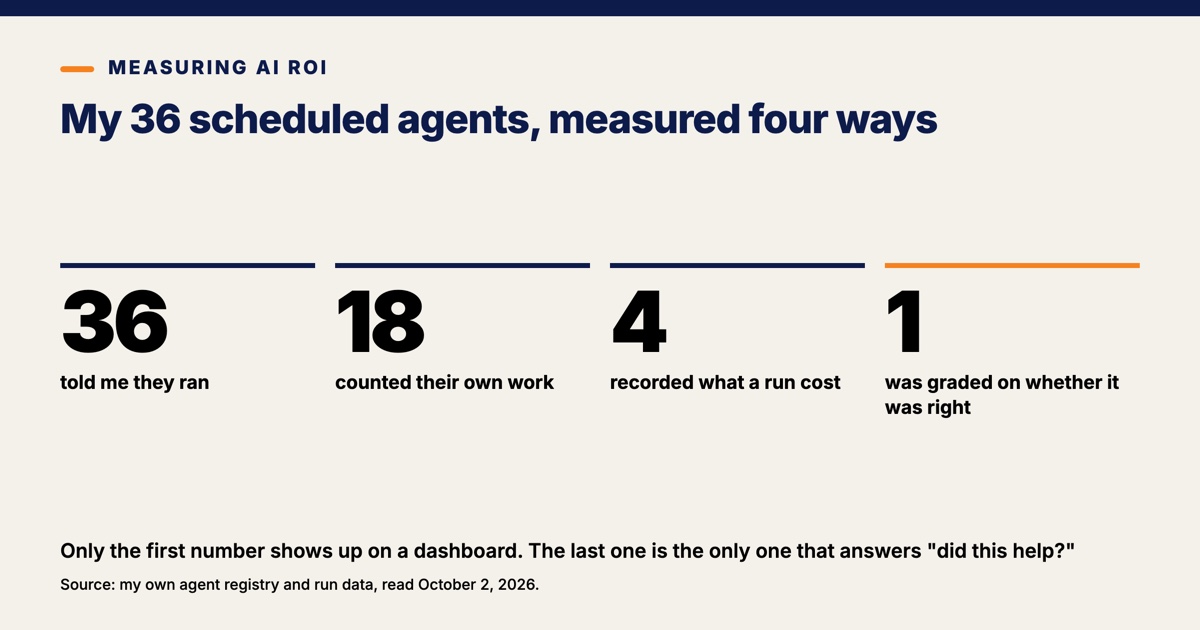
Here is what my own systems can produce instead. I run 36 scheduled AI and automation agents. In the 14 days ending this morning they ran 5,671 times and 99.24% of those runs succeeded. Eighteen of the 36 write down how much work they did. Four write down what a run cost, and only three of those four do both. One agent out of the 36 is graded on whether its output was right.
The distance between 36 agents reporting success and one agent reporting a grade is the whole problem, and none of it is a problem with the AI. Making AI behave after it is built is my job at Pioneer AI & Data, and the measurement question has a trap in it that most owners never see: the number your tools report is almost never the number that answers "did this help."
A 99% success rate is not a return
A 99.24% success rate across 5,671 runs tells me that my systems are running, and nothing more than that. Of those runs, 5,628 finished cleanly and 43 failed. The 43 failures sit in just six of the 36 agents, and the biggest group is 35 failures inside one agent's 324 runs.
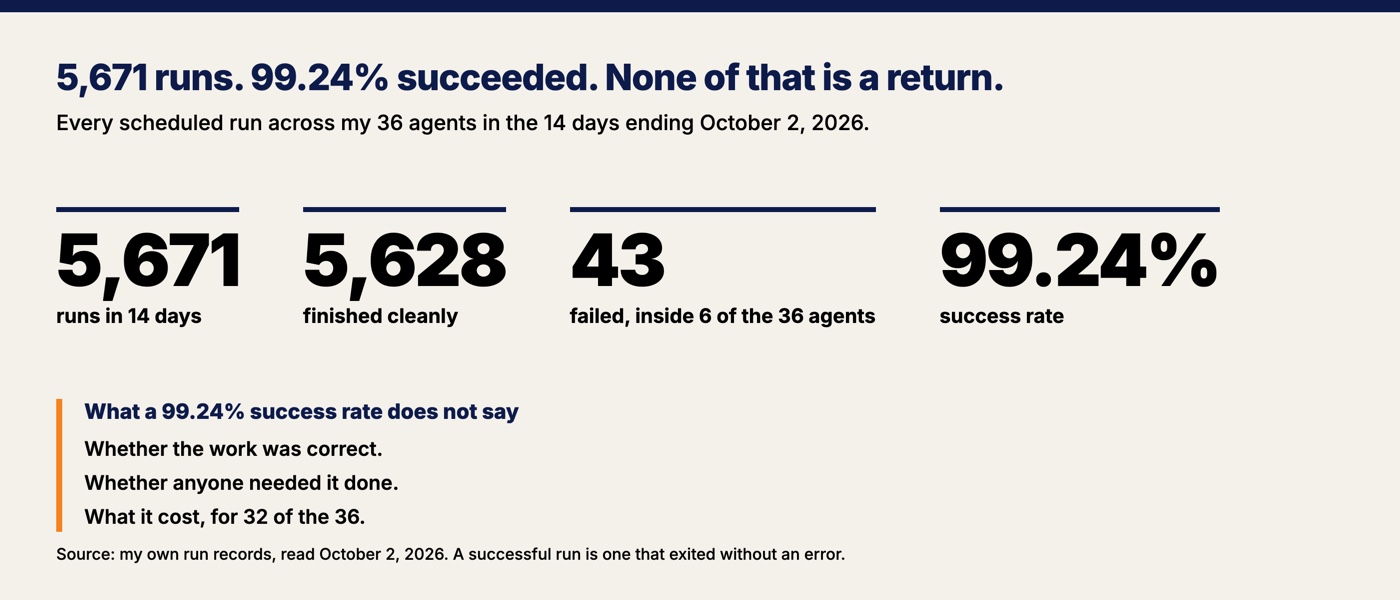
Every one of those figures is a measure of the machine, not of the work. A run that succeeds has exited without an error, and nothing about what it produced has been checked, compared, or scored. A scheduled job of mine once reported success for three days while none of its work reached anyone. Green means the code finished. It does not mean the thing you wanted happened.
Success-rate dashboards are satisfying to look at and they settle almost nothing. They are straight about what they measure. The trouble starts when a success rate gets quoted in a conversation about value.
Most of my own systems cannot tell me whether they helped
Of my 36 agents, 18 count their own work, 4 record a cost, and 1 is graded against what happened afterward. I classified all 36 by hand this morning, reading each one's latest run report and asking four questions of it.
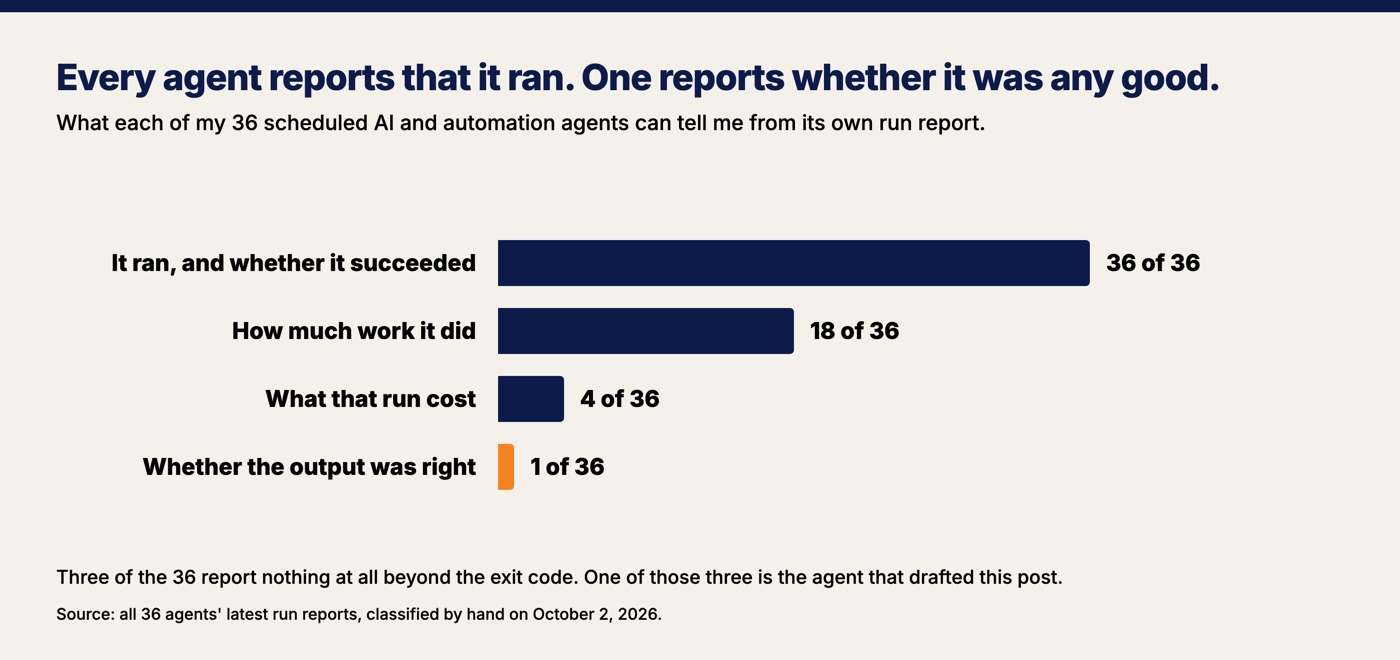
| What the report can tell me | Agents |
|---|---|
| It ran, and whether it succeeded | 36 of 36 |
| How much work it did | 18 of 36 |
| What that run cost | 4 of 36 |
| Whether the output was right | 1 of 36 |
The 18 that count are specific about it. One credential check reports that it checked 5 keys and 0 were rejected. A nightly backup reports 6 databases finished and 0 failed. The job that indexes my notes reports 1,265 notes seen, 6 of them re-embedded and 0 removed. Counts of work like those are the second rung of the ladder, and they are genuinely useful.
Fifteen more report something with no number in it at all. The shapes repeat: ok. Delivered. Pruned a file. Changed: none. Not a game day. And three file nothing beyond the exit code. No summary, no detail, nothing.
One of those three is the agent that drafted this post. It has run six times in the last two weeks, every run recorded as a success, every run with an empty report. The job that drafts writing to go out under my name tells me only that it finished.
Four agents record a cost, and their combined model spend over the trailing 30 days is $3.39. Nothing on my dashboard is estimated, which is deliberate: a cost appears only where the agent's own records wrote one down. So I know almost exactly what four of my 36 agents cost, and I have no per-run cost figure at all for the other 32.
One qualifier, because the raw share looks worse than it is. Runs from agents that do not count their own work make up 4,370 of the 5,671, or 77%. Most of that is two watchers: a health check that fires every five minutes and ran 2,508 times, and a score poller that ran 1,254 times. A watcher whose correct answer is "nothing to report" has nothing to count. The 77% is not the finding. The 18, the 4 and the 1 are the finding.
The one honest ROI calculation I can do has an assumed number in it
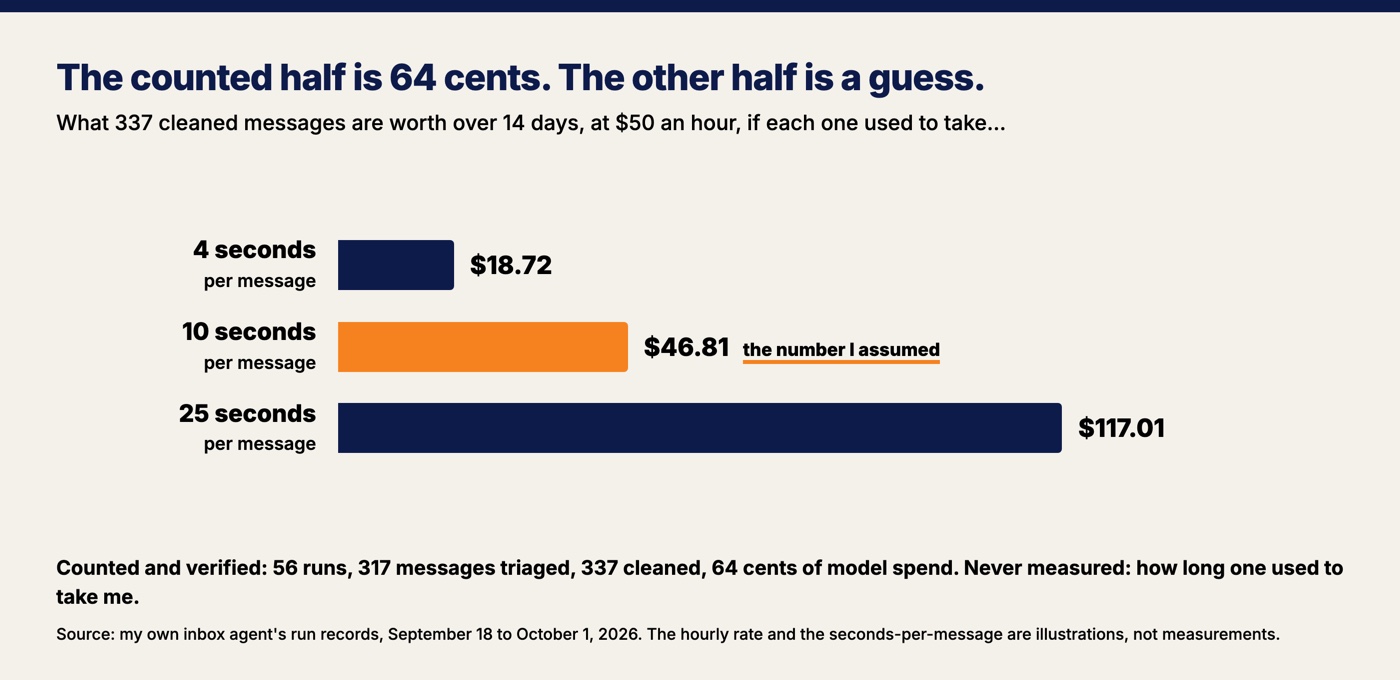
My business inbox agent is the best-instrumented thing I own, and even for that one the return calculation rests on a number nobody has measured. Over the 14 days from September 18 to October 1, 2026, it ran 56 times, triaged 317 new messages, cleaned 337, flagged 7 as needing me right away, and drafted 3 replies. It spent 64 cents on model fees, and 37 of those 56 runs cost nothing at all because a run with no new mail still runs.
Those are counted numbers and they are solid. The other half is not. To turn 337 cleaned messages into dollars I need to know how long it used to take me to deal with one, and I never wrote that down. Nobody writes that down. So suppose it was 10 seconds each. Ten seconds across 337 messages is 56 minutes over two weeks, and at a hypothetical $50 an hour that is about $47 of my time against 64 cents of model spend.
A return of better than 70 to 1, except the entire result lives inside the 10 seconds. Make it 4 seconds and it is $19. Make it 25 seconds and it is $117. I picked 10 because it sounds reasonable, which is exactly what the ROI calculators do when they hand you a 30 to 50% efficiency range. Every one of those pages supplies the term you were supposed to measure, and the arithmetic afterward is tidy and meaningless.
A smaller trap sits inside the same report line, and I walked into it this morning while adding these numbers up. Each run writes a line of fields, among them new, cleaned and owed. Two of those are counters, which tally what that run did. One is a gauge, which reports a level right now: owed is a fresh scan of how many replies are outstanding at that moment. Summing a gauge across 56 runs gave me 41 owed replies, a number that corresponds to nothing in the world. One mechanical lesson, if you take nothing else from this: before you add a column up, find out whether it counts events or reports a level.
"It feels faster" is off by about 40 points, and the newest models have not closed the gap
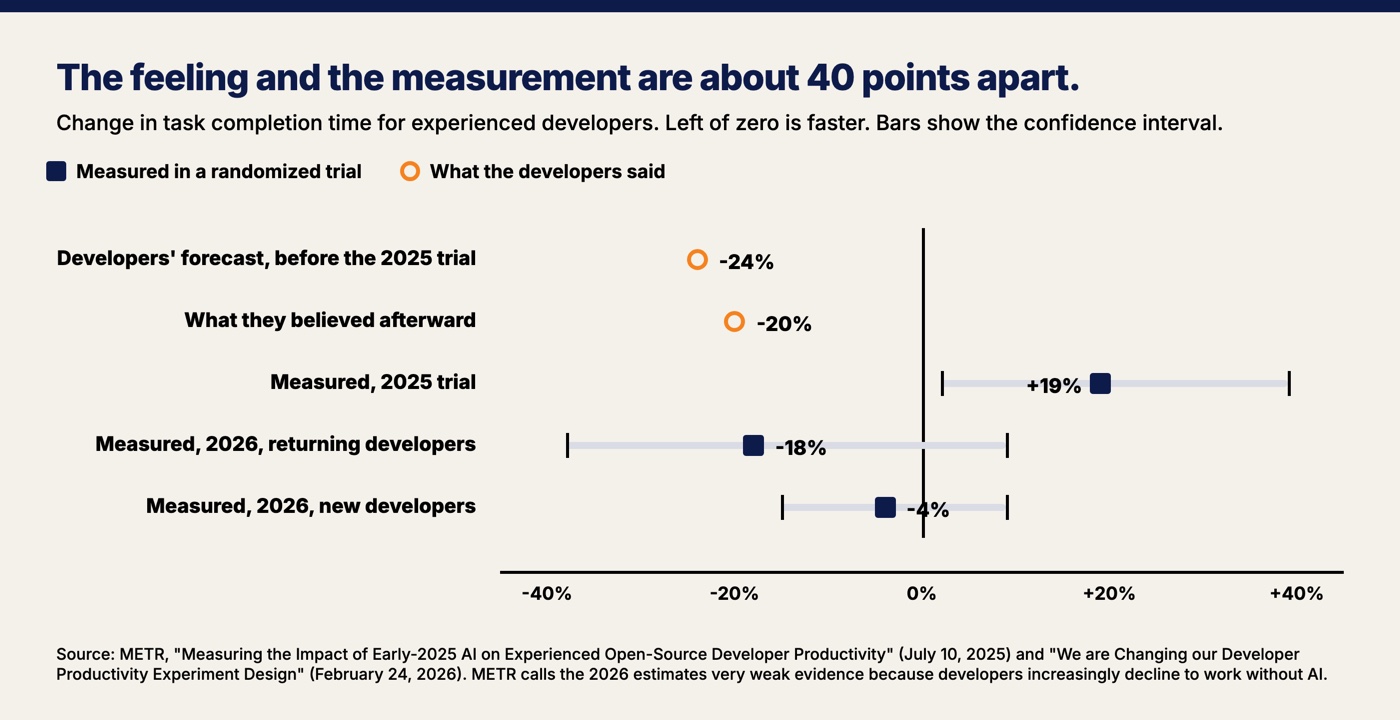
The best measurement anyone has published of the gap between feeling faster and being faster is about 40 percentage points wide. In 2025, the research nonprofit METR ran a randomized trial with 16 experienced open-source developers across 246 real tasks on large repositories. Each task was randomly assigned to allow AI or forbid it, which is what makes it a trial rather than a survey: the comparison group is the same people doing the same kind of work without the tool. Tasks took 19% longer when AI was allowed, with a confidence interval from 2% to 39% longer. A confidence interval is the range the true answer is likely to sit in, so an interval entirely above zero means the slowdown was real and not noise.
The developers had forecast a 24% speedup. Afterward, having just been slower, they estimated AI had sped them up by 20%. METR's own phrasing is that "people overestimated AI's effect on their time spent on tasks by 40 percentage points on average."
The obvious question is whether newer models have fixed this. The tools in that trial were the frontier tools of early 2025, so the question is fair, and the answer has moved. METR ran a second experiment starting in August 2025 and published the result in February 2026. The point estimate flipped: returning developers took 18% less time with AI, and newly recruited ones took 4% less. Both intervals cross zero, running from 38% less to 9% more and from 15% less to 9% more, so neither result rules out no help at all. METR also says plainly why it trusts those figures less than the first set. Developers increasingly refuse to take part in a study that makes them work without AI, and 30% to 50% of participants said they skipped submitting some tasks for the same reason, which biases the estimate downward. Its conclusion: "our data is only very weak evidence for the size of this increase."
So the measured answer in 2026 is better than in 2025 and much less certain. The self-reported answer went the other way. A METR survey of 349 technical workers run between February and April 2026 found a median self-reported speed gain of 3x. The same report says survey estimates of productivity gains have tended to run higher than the results of field experiments and quasi-experiments. My favorite detail is that METR's own staff gave the lowest estimates of any group surveyed, which the report attributes to them having the perception gap in mind.
For contrast, here is what a measured gain looks like when someone can afford to measure it. Brynjolfsson, Li and Raymond tracked 5,179 customer support agents through a staggered rollout of an AI assistant and found issues resolved per hour rose 14% on average, 34% for the newest and least skilled staff, and barely at all for the most experienced. Fourteen percent, measured with 5,179 people and a comparison group, against a self-reported 3x. You will not get 5,179 of anything. The point is the direction of the error.
Small business owners report the benefit they cannot measure
Among small employers who use AI, 30% say it increased productivity, 5% say it increased revenue, and 4% say it increased sales. Those figures come from the NFIB Research Center's 2025 small business technology survey, which polled 559 small employers and put the impact question to the 110 of them who use AI. Twenty-three percent said it improved the quality of what they sell, 8% said it lowered operating costs, and 98% reported no change in their employee count.
Look at the order. The most-reported benefit is the one nobody has a before-number for. The least-reported benefits are the two that show up in a bank account. I do not read that as small businesses fooling themselves. I read it as a reporting problem. Productivity is the right answer to "how did it feel," revenue is the right answer to "what changed," and most owners have only ever been asked the first question. Adoption is still thin enough that the question is live for most of them: the US Census Bureau puts AI use at under 20% among firms with four or fewer employees.
How to measure AI ROI in a small business, in four steps
Time the task before the tool exists, make the system count its own work, meter what it costs, and grade a sample against what actually happened. The procedure is short, and the only hard part is that step one has to happen before you buy anything.
1. Time the task before the tool exists. Pick the one task the AI is supposed to take over. Time it for a week, by hand, badly. Ten entries in a notes app beat a perfect spreadsheet you never fill in, and a rough before-number you actually wrote down beats any industry range. This is the step every calculator skips and the only step that cannot be recovered later.
2. Make the system count its own work. No count, no numerator. One line per run is enough: how many items came in, how many it handled, how many it refused. Eighteen of my 36 manage that, which tells you where most setups stop, mine included.
3. Meter the cost, and leave the parts you cannot see as holes. Four of my agents report what a run cost and 32 do not, so that is how I write it down. Saying so is worth more than filling the gap with an average. Model fees, subscriptions and the time you spend checking the output all belong in the denominator, and the checking time is the one owners forget.
4. Grade a sample against what actually happened. Take 20 outputs a month and score them against the real outcome: did the forecast land, did the draft go out unedited, did the flagged item turn out to matter. Write down the target before you look at the results. My forecasting engine's targets are dated in a comment in its own source code, set on August 5, 2026, before the code had been run once, and that date is the only reason the grades it produces mean anything.
A passing grade is per output, not per system
A system does not get one grade. My own monthly forecasting engine holds a D, an A and a C at the same time, because the three letters belong to three different outputs: its median list price forecast grades D, its days-on-market forecast grades A, and its homes-for-sale forecast grades C. Those letters come from a backtest, which replays the method over past months to see how it would have done. All three are published in the August market report, and I have written about why the simple model keeps beating the fancy one on prices.
What makes those letters worth anything is the scale underneath them. Each forecast's error is divided by the error of the dumbest possible prediction, which is that next month will look like this month. The dumb guess scores exactly 1.00 by construction, so an F means worse than the dumb guess and a D means within 5% of it. The question is never "is the AI good." The question is "is it better than the obvious alternative, on this specific output, by enough to justify what it costs."
Run the beat-the-dumb-guess test against the three rungs above the success rate and you get an answer you can act on. Counting gives you a numerator, metering gives you a denominator, and grading is the only one of the three that tells you whether the numerator was worth having in the first place. A green card just tells you the lights are on.
What this does not prove
This is one fleet, mostly built by one person, running small jobs. A larger shop with a proper data team would meter far more of it, and a solo owner with two tools would have less to count and a much easier job of counting it. My 36-agent ladder is an illustration of a general pattern, not a benchmark anyone should hold themselves against.
The ROI arithmetic in this post is deliberately not a result. It is an illustration with an assumption at the center of it, labeled as one. I do not know what my inbox used to cost me, and I never will, because I did not time it before I automated it. That is the mistake this post is written to help you avoid, and the reason I can describe it so precisely is that I made it.
Three of my agents still report nothing but an exit code as this publishes, and the one that drafted it is among them. Fixing those three is one line of output per job, and it is on the list. The step before all of it is the one I skipped and keep recommending anyway: write down what the work costs you today, while you still can, before anything automates it.
Want this run for your business?
Book a free discovery call. We map where AI fits, show you the numbers, and point you to the right plan. No pressure, no jargon.
Book a Discovery Call →