A website monitoring false alarm comes from one of two places: a checker outside your site that could not reach it for a moment, or a watch inside your server that read one odd request as a problem. The two kinds need different fixes. Nearly every page that ranks for false alarms gives the same advice: confirm the failure from more than one location. That advice only covers the first kind. On my own sites the location rule was already on, and it still let seven false "site down" alerts through in seven weeks. The rule that has held for both kinds is simpler: change an alert only after you replay it against its own history.
I run my own sites and several clients' sites, and keeping the alerts honest is part of the upkeep in my AI and data work. Here are eight false alarms of mine, what each one turned out to be, and what changed.
At 2:30 AM the alert said "site error," and nothing was down
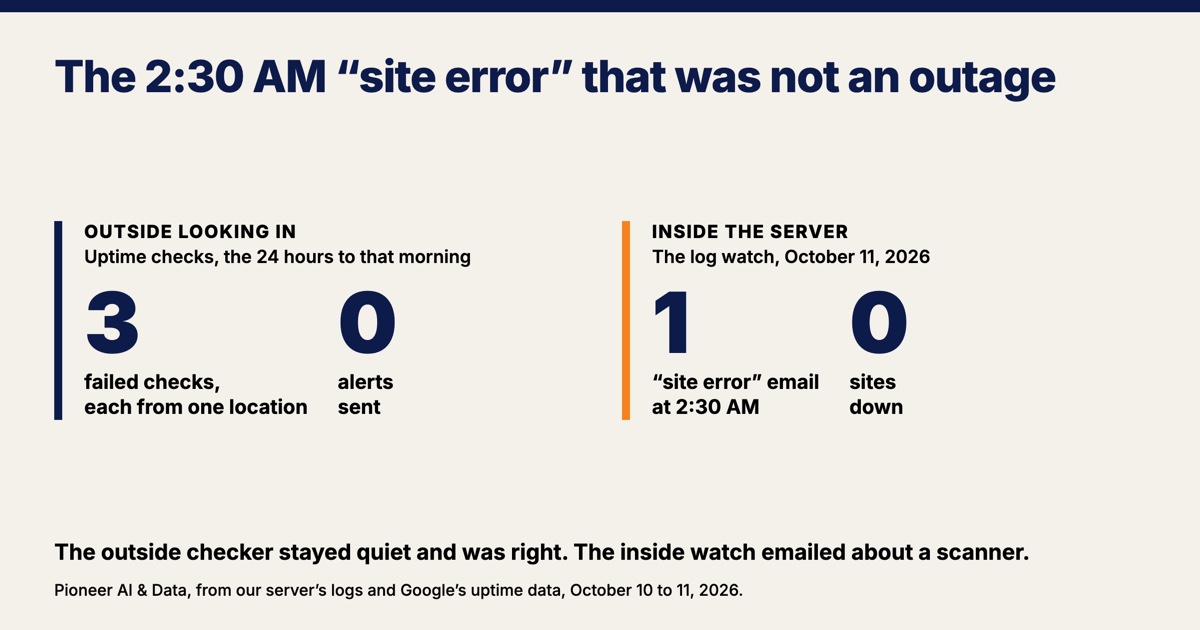
Nothing was down when a "site error" email landed in my inbox at 2:30 AM on October 11, 2026. The alert was about a scanner, not a customer. A scanner is a program that knocks on public addresses across the internet looking for something to get into. The email's subject line started "Site error" and named a log that several of my sites and my clients' sites share. I read it that morning the way anyone would read it: something is down.
The log rows show what actually happened. One caller sent two submissions to a front-page address in the same second, with no page it came from, claiming to be Chrome 65.0.3325.181 on Windows. Google released that exact version on March 20, 2018. The server dropped one of the two submissions outright because it named no site we host. The other submission was plain, unencrypted web traffic sent to the door the server keeps for encrypted traffic.
A web server answers that particular mistake with its own stock error page before any site gets a say. The documentation for nginx, the web server we run, has an internal code for exactly this case, 497, "a regular request has been sent to the HTTPS port". What lands in the log is a 400, which the HTTP standard defines as the server refusing something "perceived to be a client error". The reply that caller got matched the stock page to the byte. Seventy-eight minutes later the same caller sent raw encrypted bytes to a place expecting plain text, which is the same mistake in the other direction. No browser, form, or payment system does either one.
A website monitoring false alarm comes from one of two kinds of alert
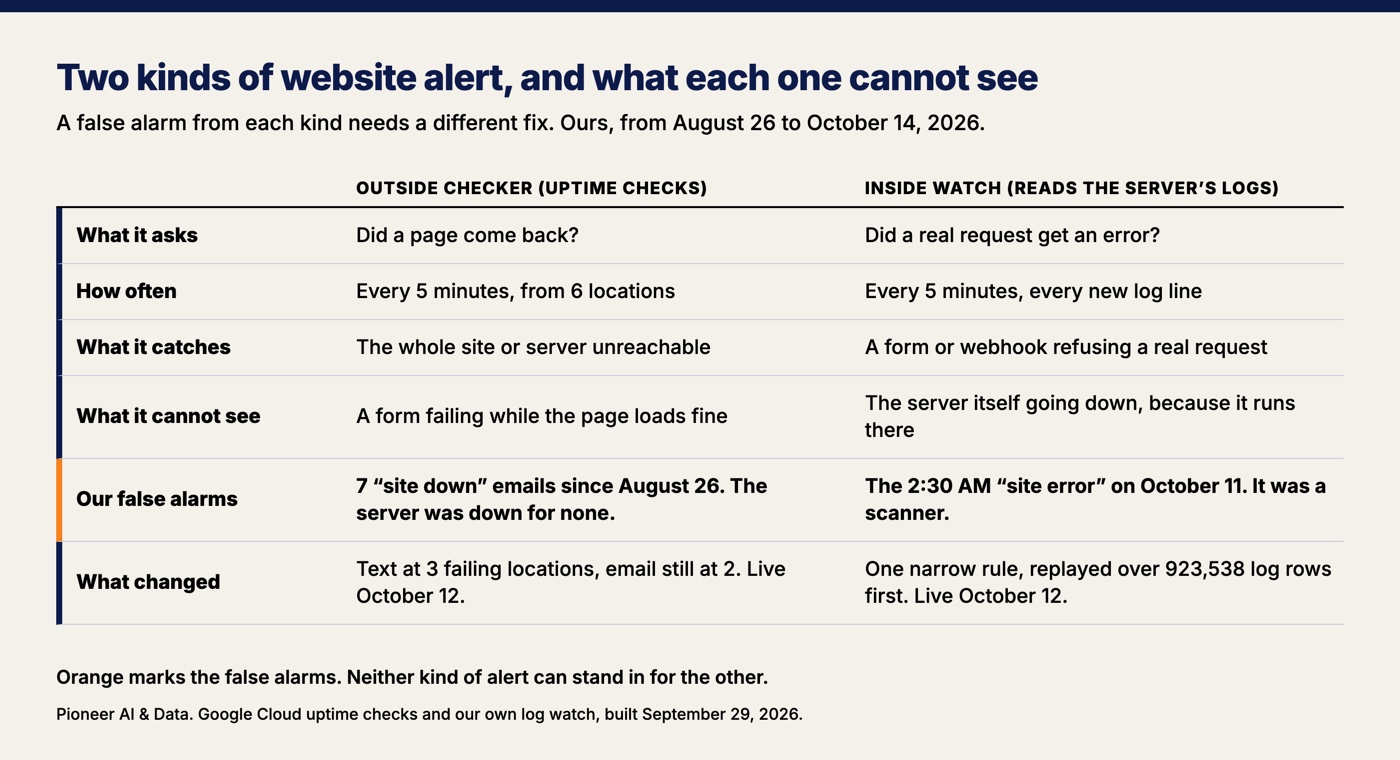
An outside checker can tell you your whole site is unreachable, and it cannot tell you a form is refusing customers. An inside watch can tell you a form refused someone, and it cannot tell you the whole server is down. A small business site needs both, and the first question about any alert is which of the two is talking.
My outside checker is Google's uptime checking. Every five minutes, from six locations around the world, it requests 16 of the addresses I run and waits up to 10 seconds for each answer. An uptime check only asks whether a page came back. A form that throws an error while the page around it loads fine looks perfect from out there, which is how I lost a real lead on September 16 without the outside checker making a sound.
My inside watch reads every new line of every site's logs every five minutes and emails me when a real request gets an error. The inside watch went in on September 29 and costs $0 a month to run. Before it went live, its rules were replayed against the previous 14 days of logs: the first set of rules would have sent 101 alerts, the noise rules brought that to 20, and the 20 still included that lost lead. The inside watch cannot tell me the server is down, because it runs on the server, and a dead server sends nothing.
Every false alarm makes the next real alert easier to ignore
A false alarm costs more than a night's sleep, because it teaches you to stop reading the alerts. Google's book on running large systems says so directly in its chapter on monitoring: "When pages occur too frequently, employees second-guess, skim, or even ignore incoming alerts, sometimes even ignoring a 'real' page that's masked by the noise."
Hospitals live with the same effect at a scale no website owner ever will. The Joint Commission's Sentinel Event Alert on alarm safety estimates that "between 85 and 99 percent of alarm signals do not require clinical intervention," and that in response clinicians "may turn down the volume of the alarm, turn it off, or adjust the alarm settings outside the limits that are safe and appropriate for the patient." The small business version of turning the alarm off is a mail rule that files every alert into a folder nobody opens.
The same Google chapter is blunt about email: email alerts "are of very limited value and tend to easily become overrun with noise," and the chapter recommends a dashboard instead. My inside watch is an email, with a card on my dashboard that shows what it last sent. What keeps the email readable is that the watch sends each problem once, then at most once a day while the problem lasts, and never more than twelve emails in a day. The rest is on me: every false alarm has to be read and explained, or the next one gets skimmed.
Confirming from more than one location still let seven false alarms through
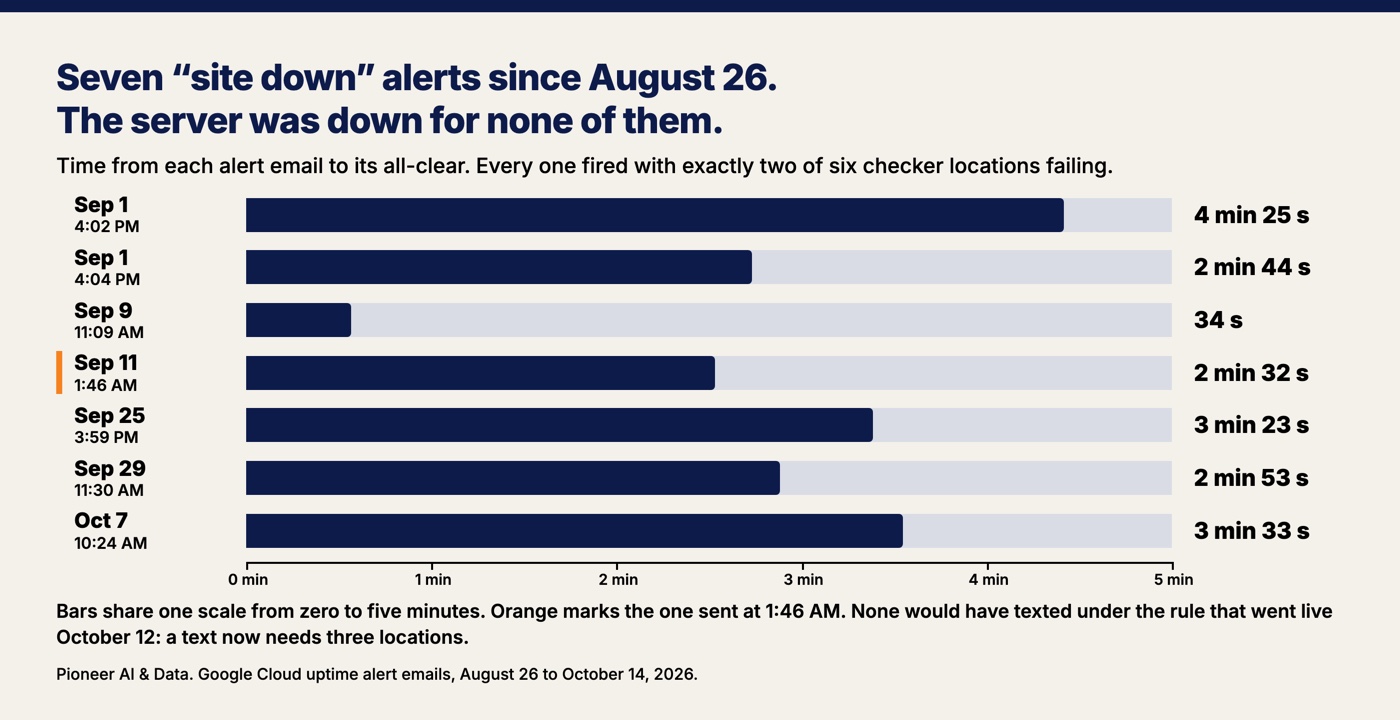
Confirming a failure from more than one location is the right first step, and it is not the last one. That rule was already on for my outside checks, and since August 26, 2026 the checks have still emailed me seven times that a site was down when the server was not down at all.
The location rule works the way the ranking pages describe. Google's own default for uptime alerts sends one only "when checkers in at least two regions fail to receive a response to an uptime check," and the failures "must occur simultaneously." My email alerts are set the same way: two locations, held for a minute. In the 24 hours up to the morning I read the 2:30 AM email, the outside checks failed three times, on three different addresses, each time from the checker in Belgium alone. One location never adds up to two, so nothing fired, which is the rule doing its job. Over 28 days a checker in Singapore failed more often than the other five, and on its own it never paged.
The seven alerts that got through all had the same shape: exactly two locations failing while the other four got normal answers. With checks every five minutes, a location that fails does not look again for five minutes, so two failures a minute or three apart count as "at the same time." Each of the seven alerts cleared in under four and a half minutes, and one went out at 1:46 in the morning on September 11. Four of the seven were two United States locations failing together, so checking only from the United States would not have stopped most of them.
"False" here means the site was not down. It does not mean nothing happened. On the two alerts recent enough to trace, a few real requests were slow or failed in the same minutes, and what made two locations fail together is still not proven.
The change that went live on October 12 raises the bar on the loud channel only: my phone gets a text when three locations fail, and the email still comes at two. None of the seven alerts would have sent a text, and a real outage fails all six locations. The cost is real and small. An outage that only two locations ever see now arrives by email and not by text, and waiting for a third location adds about half a minute to a minute on most checks. No site-down alert of either kind has fired since the change, so a real event has not tested it yet.
Replay an alert rule against its own history before you change it
Before you change an alert rule, run the old rule and the new rule over the same history and compare them, because a change that silences one false alarm can silence a real alert along with it. The fix for the 2:30 AM email was tested that way against four months of logs before it shipped, and that test is the part worth copying.
The history settled the question. From June 8 to October 11, 2026, the logs held 484 requests that tried to send or change something at a front-page address, and not one of them got a success answer. None of my sites takes a submission at its front page. Only three of the 484 got the 400 behind that email: the one on October 11 and two on September 27, two days before the inside watch existed.
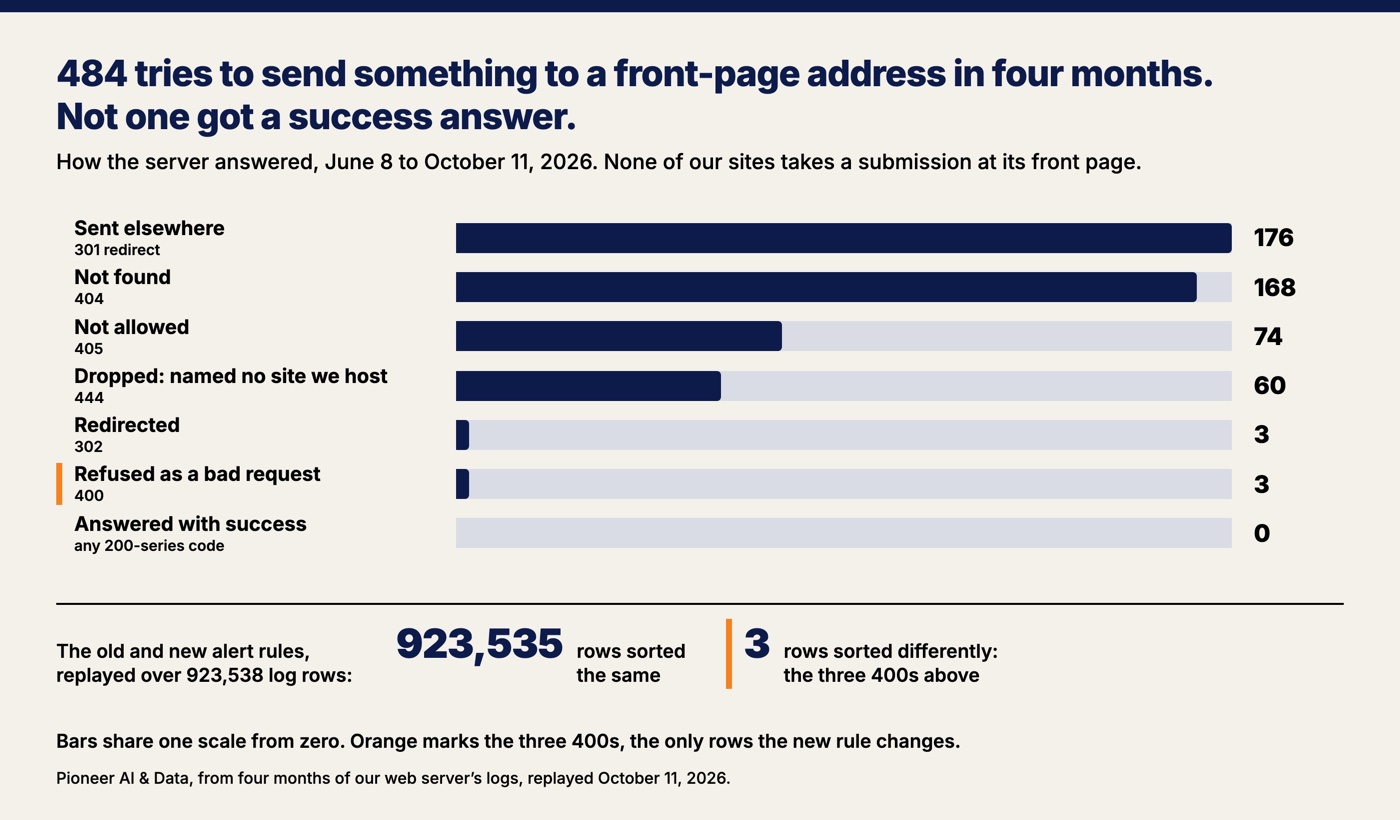
The new rule counts a 400 on a submission to a site's front page as noise. The old rule and the new rule were then both run over 923,538 log rows. The two rules sorted every row the same way except three, and those three were exactly the rows the change was meant to catch. Across those four months the old rule would have flagged 16 rows as problems and the new rule flags 13. The other 33,298 rows the watch noticed (scanners, dropped requests, brief blips) were already counted as noise and ignored under both rules.
Narrow the fix to what the evidence shows, then expect the next alert
A fix to an alert rule should cover exactly what the evidence shows and nothing more. The first version of the 2:30 AM fix covered more, and the reviewer flagged it.
The digging and the fix were done by an AI session working on my approval, and a second session that wrote none of it reviewed the work three times. The reviewer's first pass said the new rule was wider than its evidence, so the rule was narrowed to the one case the logs showed: a 400 on a submission to a front page. Everything the old rule reported still reports except that one case. A server error at a front page still reports. So does a 400 on a submission to any other address, and so does a refused webhook, which is the automatic notice a payment company sends your site. A test now fails if anyone puts the old rule back, and the code carries a note that the rule has to go the day any site starts taking submissions at its front page. I ran the release myself on October 12 at 8:56 AM.
Thirty-seven hours after the release, at 10:00 PM on October 13, the inside watch emailed again about a request at 9:57 PM. The new email had the same shared log, a refused submission, a 400, and a caller claiming to be Chrome on Windows, but on a different address, one that appears nowhere in my code. The narrow rule let the new one through, which is what it was built to do. When this post was drafted the next morning, that email was still sitting unread, and I do not know yet whether it is the same trick.
The tempting move is to widen the rule until the new email goes quiet too. A rule widened on a hunch is how a real lead gets silenced one day. The next step is the same as the last one: read the rows, then replay.
How to read a website alert at 2:30 in the morning
Start by finding out which kind of alert you are holding, because the answer decides everything else. Here is the order I would go in, and none of it needs a developer.
- Find out who sent it. An outside checker and a watch on your own server send different emails. Know which sender is which before the night you need to, and write it down in one paragraph.
- If it came from outside, count the locations. One location failing is that location's problem. Two at once is worth a look in the morning. Every location failing is an outage.
- If it came from inside, ask whether a person could have sent it. A real visitor's browser does not send plain text to a secure port. Scripts knocking on doors do, and my logs counted 9,236 scanner probes in four months.
- Do what a customer does. Load the site on your phone over cell data and submit your own form. It takes two minutes and answers the only question that matters at that hour.
- Replay before you change a rule. Run the old rule and the new rule over the history you have. If the two disagree on anything besides the rows you meant to change, do not ship the new one.
- Write the answer down. The second time the same alert comes in, it should take two minutes, not a morning.
Google's monitoring chapter has a question I would put on every alert a small business runs: "Will I ever be able to ignore this alert, knowing it's benign?" If the answer is yes, fix the rule. Just fix it on the evidence and not one step past it.
The opposite problem, a site that breaks without any alert at all, is the harder one, and I wrote up four of ours in how to know your website is broken before a customer does.
Want this run for your business?
Book a free discovery call. We map where AI fits, show you the numbers, and point you to the right plan. No pressure, no jargon.
Book a Discovery Call →